I had experimented a little bit with the Web Audio API by making a synthesizer and a way to create custom Sound FX similar to Recreational Software Designs: Game Maker. My new focus is on short-range data transfer between two devices using the Web Audio API. My first computer stored software on a cassette drive using audio. With only 16k of memory, I remember that it seemed to take hours to load up a game like Salmon Run from what appeared to be an audio cassette. The ringing sound as the data loaded was constant annoying. In the 90’s, my brother purchased a computer with a 2400 baud modem that included a subscription to Promenade – similar to America Online. We would tie up the phone lines with computer noises as we reached out to the world. We later learned about BBS’s.
So – data can be sent over audio. It’s an old technology. Can Web Audio API do the same? How fast can data be transferred? Does it sound like noise? Can it be supersonic or subsonic? Can data be hidden within “normal” audio? Can the audio be identified with background noise?
My end goal is to transfer around 5kb of data. Let’s look at some early technologies of transferring data over audio.
| Device | Baud | Bytes per second |
|---|---|---|
| Commodore 64 Tape Drive | 300-600 | 37.5 to 75 |
| Atari 410 Cassette Drive | 600 | 75 |
| Modem | 300 | 37.5 |
| Modem | 1200 | 150 |
| Modem | 2400 | 300 |
| Modem | 4800 | 600 |
| Modem/Fax | 9600 | 1,200 |
| Modem | 14.4k | 1,800 |
| Modem | 28.8k | 3,600 |
| Modem | 33.6k | 4,200 |
| Modem | 56k | 7,000 |
| 5.25″ Floppy | N/A | 31,250 |
If I can achieve a baud rate of 4800, it would take almost nine seconds. That’s reasonable, but If I can only get up to 300 baud, it could be two and a half minutes. That’s not including any checksums to ensure the data transferred reliably. A slower data rate would mean that I would need to break up the transfer into smaller portions and get creative with occupying the players time so they don’t get bored.
Well, let’s start off simple. Let’s see if we can generate a tone, and recognize when the tone occurs.
Source code on GitHub: lewismoten / data-over-audio
Here is the initial mockup. You’ve got an input to type a message, a button to send, a checkbox to listen, and two textboxes to show what was sent and received.

Let’s just wire up the send button to create a tone with an oscillator, and wire up the Listening checkbox to start and stop using the microphone.
Here we are with some vanilla JavaScript.
var audioContext;
var sendButton;
var isListeningCheckbox;
var microphoneStream;

function handleWindowLoad() {
  // grab dom elements
  sendButton = document.getElementById('send-button');
  isListeningCheckbox = document.getElementById('is-listening-checkbox');

  // wire up events
  sendButton.addEventListener('click', handleSendButtonClick);
  isListeningCheckbox.addEventListener('click', handleListeningCheckbox);
}

function getAudioContext() {
  if(!audioContext) {
    audioContext = new (window.AudioContext || webkitAudioContext)();
  }
  if(audioContext.state === 'suspended') {
    audioContext.resume();
  }
  return audioContext;
}

function handleSendButtonClick() {
  var audioContext = getAudioContext();
  var oscillator = audioContext.createOscillator();
  oscillator.frequency.setValueAtTime(500, audioContext.currentTime);
  oscillator.connect(audioContext.destination);
  oscillator.start();
  window.setTimeout(function() { oscillator.stop(); }, 100);

}
function handleListeningCheckbox(e) {
  var audioContext = getAudioContext();
  function handleMicrophoneOn(stream) {
    microphoneStream = stream;
    audioContext.createMediaStreamSource(stream);
  }
  function handleMicrophoneError(error) {
    console.error('Microphone Error', error);
  }
  if(e.target.checked) {
    navigator.mediaDevices
      .getUserMedia({ audio: true })
      .then(handleMicrophoneOn)
      .catch(handleMicrophoneError)
  } else {
    if(microphoneStream) {
      microphoneStream.getTracks().forEach(track => track.stop());
      microphoneStream = undefined;
    }
  }
}
window.addEventListener('load', handleWindowLoad);
I’m creating a tone, and I’m turning the microphone on and off when the checkbox is checked. Now, let’s see if we can capture when the tone sounds. For this, I think we need to use the audio analyzer.

At first I thought maybe I had it. Any time I clicked the button, the message would display that it detected a frequency. Then I saw the message would appear regardless of me simply talking.
function handleListeningCheckbox(e) {
  var audioContext = getAudioContext();
  function handleMicrophoneOn(stream) {
    microphoneStream = stream;
    microphoneNode = audioContext.createMediaStreamSource(stream);
    analyser = audioContext.createAnalyser();
    analyser.fftSize = 2048;
    microphoneNode.connect(analyser);
    requestAnimationFrame(analyzeAudio);
  }
  function handleMicrophoneError(error) {
    console.error('Microphone Error', error);
  }
  if(e.target.checked) {
    navigator.mediaDevices
      .getUserMedia({ audio: true })
      .then(handleMicrophoneOn)
      .catch(handleMicrophoneError)
  } else {
    if(microphoneStream) {
      microphoneStream.getTracks().forEach(track => track.stop());
      microphoneStream = undefined;
    }
    if(analyser && microphoneNode) {
      analyser.disconnect(microphoneNode);
      microphoneNode = undefined;
      analyser = undefined;
    }
  }
}

function analyzeAudio() {
  if(!analyser) return;
  if(!microphoneNode) return;
  var audioContext = getAudioContext();
  const frequencyData = new Uint8Array(analyser.frequencyBinCount);
  analyser.getByteFrequencyData(frequencyData);

  var frequencyIndex = Math.round(FREQUENCY_TONE / (audioContext.sampleRate / analyser.fftSize));
  const amplitude = frequencyData[frequencyIndex];
  if(amplitude > 0) {
    receivedDataTextarea.value = `Frequency Detected. Amplitude: ${amplitude}`;
  } else {
    receivedDataTextarea.value = 'Frequency Not Detected.';
  }

  requestAnimationFrame(analyzeAudio);
}
What I need is a graph to see what the amplitude is over time. Maybe I just need to capture a threshold for the frequency.

I created a graph. What I’m noticing is that anything I say is a high amplitude at 500 Hz. Clicking the button only causes small peaks. Even if I whisper, the amplitude is much higher than the oscillator. To my ears, the beep sounds much louder than my whispers.
I bumped up the frequency to 10Khz and made it last half a second instead. It’s definitely showing up in the graph now. It doesn’t show as an on/off frequency, but has curved peaks. In addition, as I fiddle in my seat and make my own noises, the analyzer still picks that up as 10Khz as well, as can be seen in the center of the image:

I’m missing something here. The audio sounds like a mosquito. When I move around, my sounds are not that high pitched. I’m making a call to analyser.getByteFrequencyData(frequencyData) and pulling just my frequency from it. Let’s create another canvas and write out everything the audio analyser sees.

As I spoke, I could see all the frequencies that I created – including 10,000 Khz. I didn’t realize that normal speech included high frequencies, but without high amplitudes as the lower frequencies. What I did see is the lonely tone being generated as well. So this means that it is working.
This may be a difficult problem. How do I isolate data in an environment with background noise? Hmm… well, I’m thinking telephones. When using a telephone, you can dial a number while talking to anyone in the room. Pay phones dealt with background noises of traffic. Yet the sounds of the keys could be identified. The question is – did the phone disconnect the microphone while it sent the signal, or did it send the signal in addition to background noise? Well… auto dialers worked when you held them up to the telephone. Let’s see if I can find anything about dial tones and such.
But first, I still think I’m moving ahead to fast. My signal is showing up. But it’s tiny. Lets move it back down to the lower end of the frequency spectrum and see if its amplitude increases.
Lower signals hardly show up on the spectrum. Higher signals – they do. 18KHz is hardly noticeable to my ears. It definitely shows up on the graph, and my speech rarely creates anything on the graph in that range. I may have to stick with high frequencies for data transfer.
Let’s try to send a string of bits to represent an ascii character – like pressing a key in the input box. I defined a high and low frequency, and a duration for each bit. When a key is pressed, I get the ascii value of the key, convert it to a string of bits, and set an oscillator to change to high or low values accordingly.
var FREQUENCY_HIGH = 900;
var FREQUENCY_LOW = 1200;
var FREQUENCY_DURATION = 100;
function handleTextToSendKeypress(event) {
  var keyCode = event.which || event.keyCode;
  var bits = keyCode.toString(2)
    .padStart(8, '0')
    .split('')
    .map(Number);
  sendBits(bits);
}
function getFrequency(bit) {
  return bit ? FREQUENCY_HIGH : FREQUENCY_LOW;
}
function sendBits(bits) {
  var audioContext = getAudioContext();
  var oscillator = audioContext.createOscillator();
  var duration = bits.length * FREQUENCY_DURATION;
  for(var i = 0; i < bits.length; i++) {
    if(i > 0 && bits[i] === bits[i-1]) continue;
    var offset = ((i * FREQUENCY_DURATION)/1000);
    oscillator.frequency.setValueAtTime(
      getFrequency(bits[i]),
      audioContext.currentTime + offset
    );
  }
  oscillator.connect(audioContext.destination);
  oscillator.start();
  window.setTimeout(function() { oscillator.stop(); }, duration);
}
This resulted in a drawn out audio of two tones.
Now the question is – can I capture it with the microphone? The audio spectrum that I drew onto the canvas doesn’t seem to be reacting to the audio signal as it is played.
Well here is something. I started looking at what exactly fftSize is. Bumping it up to the max (2 ** 15), my frequency jumped up pretty high. I started to see the binary audio show up too.

If I drop it down to 2 ** 5, I only get 16 lines on the chart.

My take on it is this. If I can isolate frequencies to use for my data transfer, I may need to increase the “resolution” to fine tune frequencies that are closer to each other. For now – I should probably focus on frequencies that are far apart on the spectrum. Once I can pair up the first group of on/off frequencies, I can choose two more frequencies in between them to double the speed.
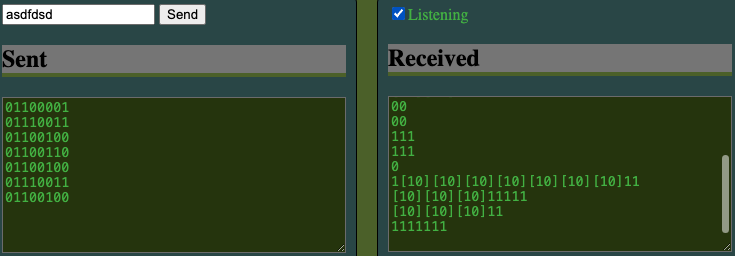
Ok – onto isolation… The first bit is to listen on the high/low frequencies and build up a string of bits. If high is heard, write a 1, if low, write a 0, if none – append the full string to the text box. If I hear both high and low, surround the two values with brackets.

Well, without watching it in action, it looks like I’m receiving something from the signals… but in reality, that’s just it responding to me talking. It doesn’t respond to the signal. Here is the logic that I have so far.
var FREQUENCY_HIGH = 900;
var FREQUENCY_LOW = 1200;
var FREQUENCY_DURATION = 100;
var FREQUENCY_THRESHOLD = 50;

let listen = '';
function analyzeAudio() {
  if(!analyser) return;
  if(!microphoneNode) return;
  var audioContext = getAudioContext();
  const frequencyData = new Uint8Array(analyser.frequencyBinCount);
  analyser.getByteFrequencyData(frequencyData);
  drawFrequencyData(frequencyData);

  function canHear(hz) {
    var length = (audioContext.sampleRate / analyser.fftSize);
    var i = Math.round(hz / length);
    return frequencyData[i] > FREQUENCY_THRESOLD;
  }

  var high = canHear(FREQUENCY_HIGH);
  var low = canHear(FREQUENCY_LOW);
  if(high || low) {
    if(high && low) listen += '[';
    if(high) listen += '1';
    if(low) listen += '0';
    if(high && low) listen += ']';
  } else {
    if(listen !== '') {
      receivedDataTextarea.value += listen + '\n';
      receivedDataTextarea.scrollTop = receivedDataTextarea.scrollHeight;
    }
    listen = '';
  }
  requestAnimationFrame(analyzeAudio);
}
I recall seeing an audio example to tune a guitar. Let’s see if I can find it. I couldn’t find what I saw previously, but I did find qiuxianb / tuner source code to an online tuner app.

It looks like they are calling audibo to do pitch detections.
aubio().then(function (aubio) {
    self.pitchDetector = new aubio.Pitch(
      "default",
      self.bufferSize,
      1,
      self.audioContext.sampleRate
    );
    self.startRecord();
  });
Here we go, it’s a library included in their index.html page – https://cdn.jsdelivr.net/npm/aubiojs@0.1.1/build/aubio.min.js
It looks like the person who created the tuner also created aubiio as a separate library on GitHub qiuxian / aubiojs, which appears to be a port of aubio written in C. This is weird. I’m seeing files with cc extensions in a javascript library.
I’m not finding JavaScript in the library, or references to the audio context. It’s mostly C++. I’m a bit confused how they created a JavaScript library using C++ files… but somehow the documentation looks like they pulled it off. Let’s look for other examples and come back to this if we can’t find anything.
Here we go! This is the tuner example I saw earlier.

Source code is cwilso / PitchDetect on GitHub. Let’s see what they’ve got. Right off the bat I see some calculations on the max size:
audioContext = new AudioContext();
MAX_SIZE = Math.max(4,Math.floor(audioContext.sampleRate/5000));	// corresponds to a 5kHz signal
Weird. The variable isn’t used anywhere. I see they use the default 2048 for the analyzers fftSize. So, I shouldn’t need to increase that if they were able to do this with the default size. I keep seeing them getting user media with disabling various microphone settings.
getUserMedia(
    	{
            "audio": {
                "mandatory": {
                    "googEchoCancellation": "false",
                    "googAutoGainControl": "false",
                    "googNoiseSuppression": "false",
                    "googHighpassFilter": "false"
                },
                "optional": []
            },
        }, gotStream);
I wonder if some of these settings are causing problems with my analyzer. Ok, here is the main code. They have an updatPitch function. They are using getFloatTImeDomainData instead of getByteFrequencyData. Then the call autoCorrelate. Lots of maths in there. Interesting. Just looking at how they detect if there is enough signal strength. They are multiplying the value against itself, and then checking if the square root and array length is enough.
var total = 0;
for(var i = 0; i < buffer.length; i++) total += buffer[i] * buffer[i];
if(Math.sqrt(total/buffer.length) < 0.01) return; // no signal
It’s getting late. I’m going to post a link to this file and function here so I can take a look tomorrow.
One response to “Data Over Audio”
[…] started this little project to send Data Over Audio at the beginning of the month. It’s been a crazy and fun ride learning about audio […]