I started looking at the old manual about .VOC files. Its for making PC speaker sounds, but all 30 sounds are saved as one .VOC file that is compatible with the Sound Blaster. My assumption is that the “VOC” extension stands for “Voice”, and is simply an audio buffer that isn’t specific to wave forms. I couldn’t find any additional details in the manual regarding the frequency values, duration, or wave form.
I went back to the DOSBox website to create a sample pattern of audio to record an analyze, altering between high and low frequencies. This was done to give me some markers to evaluate the duration of each marker.

From here, I was able to recode the audio with Audacity. Zooming in fairly close, I saw that it generated sine wave forms. I honed in on the duration between two of the alternating bars. Selecting an area starting at a high peak, and ending at the end of the low frequency resulted in 0.014 seconds – indicating that each bar represents 0.007 seconds.

The next task was to determine the value of the higher frequency. I analyzed the audio with a plot spectrum set to graph the frequencies. It looked like the loudest part of the sound was around 4070 Hz


From this point, I have collected enough data to start implementing it within the experimental audio api app.
| Property | Value |
|---|---|
| Bar Duration | 0.007 seconds |
| Bar Count | 36 |
| Total duration | 0.252 seconds |
| Max Frequency | 4070 Hz |
| Wave Form | Sine |
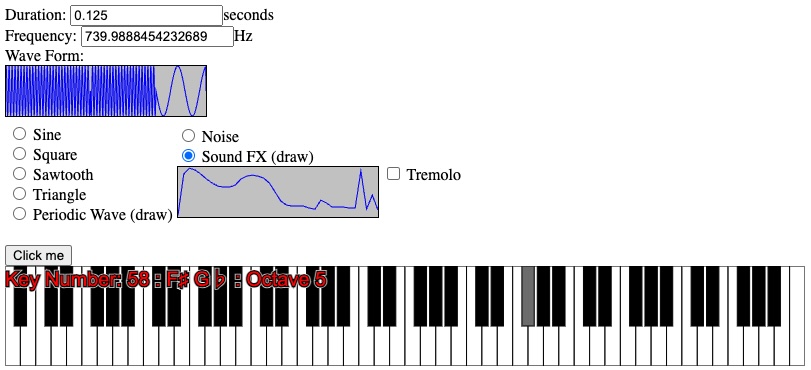
After making a few changes to the audio-fx project to inject sign waves for each bar in the audio buffer, I was able to get it to react similar to the sound editor in RDS Game Maker. Just click and drag your mouse to change the frequency!

So what was this all for? I want players to have the ability to get creative. Not with just textures alone, but also to create their own sound effects. With just 36 numbers, I can create a very lightweight audio format using 36 bytes of data, where each value is multiplied by 16 to get the frequency. It would bump the maximum frequency to 4,080 Hz. One caveat is that people generally can’t hear below 20 Hz. Should I modify the frequency mapping so that “1” can be heard, or just leave it as-is.
| Byte Value | Frequency |
|---|---|
| 0 | 0 Hz |
| 1 | 16 Hz |
| 2 | 32 Hz |
| … | … |
| 255 | 4,080 Hz |
I could also make it so that the file indicates how many “bars” there are (36), and another value representing the duration of each bar. Allowing control over the duration and number of bars would pave way for also storing simple songs in addition to short sound effects.
| Data | Data Type | Hex | Decimal | Value |
|---|---|---|---|---|
| Bar Count | UInt16 | 00 36 | 36 | 36 Bars |
| Bar Duration Milliseconds | UInt16 | 00 07 | 7 | 0.007 seconds |
| Bar 1 | Byte | 04 | 4 | 64 Hz |
| Bar … | Byte | … | … | … Hz |
| Bar [Bar Count] | Byte | 3B | 59 | 944 Hz |
The code is on GitHub: CodeJamboree/audio-fx 00f6f84362e7dcc6697d4c9ddeb271a386e28792
2 responses to “Audio Analysis”
[…] had experimented a little bit with the Web Audio API by making a synthesizer and a way to create custom Sound FX similar to Recreational Software Designs: Game Maker. My new focus is on short-range data transfer […]
[…] store a small amount of data that instructs us as to how to build the sound effect. I can currently make sound effects with 36 bytes of data letting users draw their sound effects similar to what the old RDS Game Maker […]