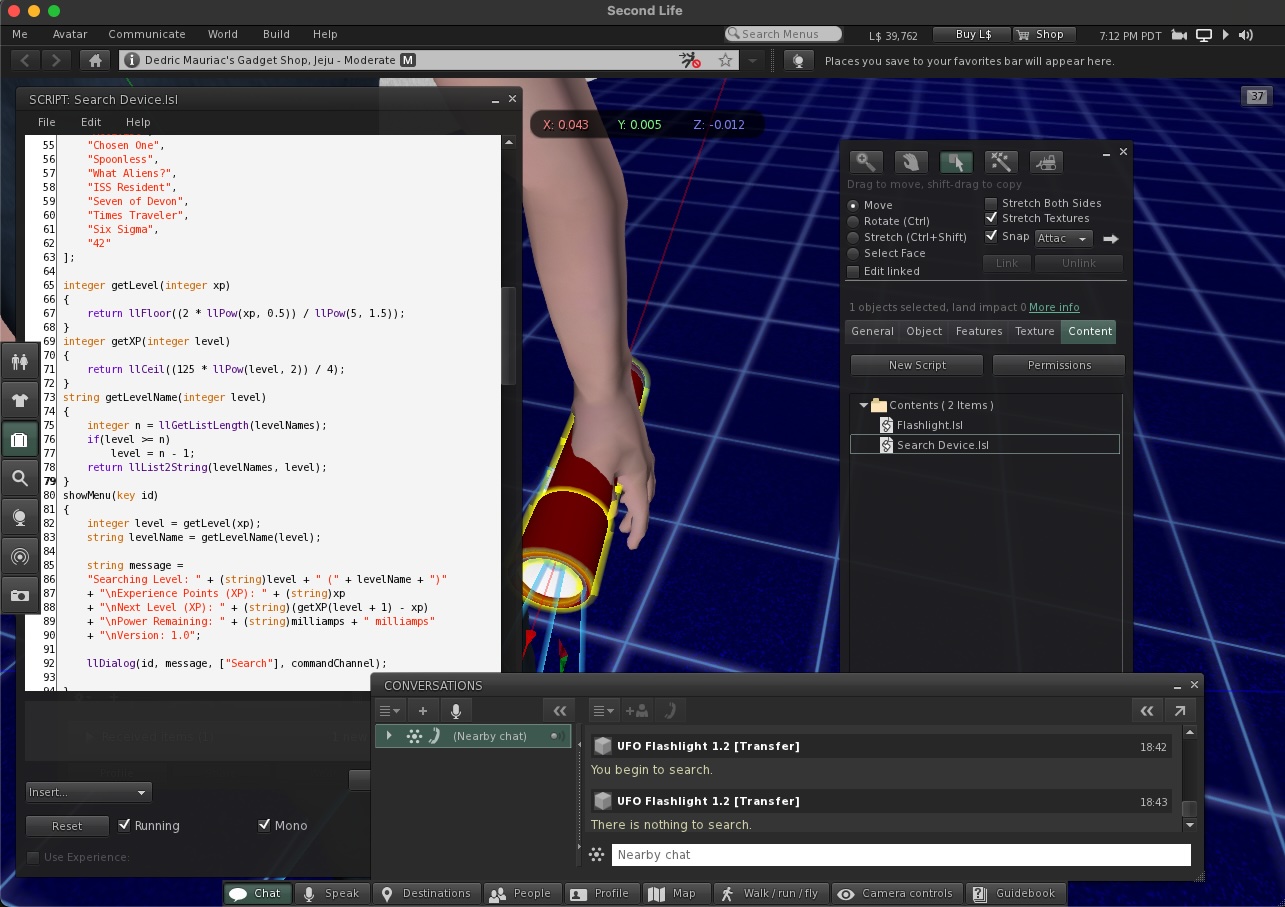
So I kept thinking to myself – what did the original game actually do? I had a working prototype, but I hadn’t put it on the market. It’s time to get to the bottom of it.
The first thing to do was to start looking at the flash light. I equipped it onto my avatar and started looking at the code and found that it had a menu. I clicked that and began my search… and it found nothing.

The Flashlight.lsl script simply toggled the bulb and beam on and off if the owner of the object touched it. I believe the flashlight may have been an existing product that I had made much earlier, and had modified it for this game. The real details were in the Search Device.lsl.
The flashlight itself contained the number of milliamps, experience, and a searching state. It also contained a list of level names. Once it was worn or rezzed, it would clean up any previous listeners and add new listeners for commands from both the owner and any UFO game servers in the current region.
Once clicked, it would show a dialog menu displaying your level name and value, experience points, points needed for the next level, power remaining, and the version of the script. It’s interesting as the light itself stored the entire game state. Your only option was to click a search button.
Some guards were in place to check the milliamps, or prevent you from starting a new search while you were already searching. Afterwards, it would send a message with the owners unique id, experience, and a search command to a hidden channel so that any UFO Game Servers in the current region could take action. It also set a timeout and tell the owner that there was nothing to be searched.
A server could send three commands. “add milliamps” allowed the user to recharge the device with the server. “found something” will decrease the power, add experience, and tell the owner what they found and how much experience was gained. “found nothing” would still decrease the power and tell the owner that they didn’t find anything, but that they are in the correct area to find something.
Without a website API to hook into, it’s very simple and looks like it would work just fine. There are concerns that I have in regards to how land owners/renters could setup multiple servers to drain someones milliamps much quicker. Someone who has multiple flashlights could run into the same problems as well as two searches at the same time would potentially drain both items energy twice as fast.
Recharging
The next item I looked at was the Solar Power Recharge Station 1.0. I got a nice warning from the Second Life Viewer requesting total access to my Linden dollars. I initially saw one of my alternate accounts was setup as the accountant that receives money. There were various triggers to request PERMISSION_DEBIT with the state entry, transferring of ownership, and when the owner touches the object.
The main guts of the script would give a 20% commission to the accountant. It would calculate the number of milliamps to distribute based on how much money was received. The base rate was one milliamp for each Linden Dollar. A payment more than 50 L$ would increase by 20%. 150 L$ or more would yield a 50% increase.
The recharge station would change its own name to the id of the person who just paid money and send the “add milliamps” command, before changing back to its original name. This boggles my mind. The flashlight doesn’t do a check to see that the object sending the “add milliamps” command matches the owner id of the flashlight. Anyone who is in the region during a recharge would get the milliamps in addition to the owner.
The last line is a comment to contact a web database instead of the region… that could be where I had left off.

Searching the Search
The last part of the puzzle is the area server that listens for players to search. That’s the bit that tells you if you found something or not and gives you experience and an object as a reward. I found the crop circle texture, but my inventory is so large with over 30,000 items, I’m unable to find it. I’ve tried to search for “Ufo”, “Area”, “Server”, “Kit”, “Search”. My biggest fears it that it was returned into my inventory with a large number of objects, giving it a different name, or it still has the default name “Object”. It definitely exists as I have tons of my UFO copies that were transferred to me by the object. I wish I could search my inventory by date. Given that I know the servers channel id, I’d love to be able to search the contents of scripts within all objects to find which ones have it.
I’ll have to come back to this later, but from what I have found already – I can already tell that the server just needs to randomly determine if the player found something, the rare classification of the item, and then award a random item that matches the classification from its inventory.
- (DM) Common UFO: Green
- (DM) Uncommon UFO: Pink
- (DM) Rare UFO: Purple
- (DM) UltraRare UFO: Blue
- (DM) SuperUltraRare UFO: Funky
Something similarly related is the “(DM) PrizeBox” with many versions up to 2.4 [b]. This box has a web-based backend that tells it to send items to people. I’m curious if this was what the alien site server became.
In any case, I think I found enough and I need to move on to the next part of the adventure.