Yesterday I left off with adding the transform controls to an individual vertex in my scene. I was able to move an object that represented the vertex, but the vertex itself didn’t move, and the transform controls were not limited to the bounding box.

What was done so far was that a new toolbox item was added to move vertices, and the tool controls were wired up to disable/enable the transform controls and camera. One of the things I added was debouncing so that the models were not rebuilt constantly while the controls were being dragged within the scene.
  const handleChange = debounce(applyTransform, 100);
  const handleDragged = debounce((event) => {
    if(!transformControls.enabled) return;
    if(cameraOrbitControls) cameraOrbitControls.enabled = !event.value;
    if(!event.value) applyTransform();
  }, 100);
  transformControls.addEventListener('change', handleChange);
  transformControls.addEventListener('dragging-changed', handleDragged);
The debounce function is fairly simple. It sets a timeout before your function is called. If the function is called again before the timer runs out, it resets the timeout. Instead of getting 10 calls to your function while dragging the controls, the last one is called a short delay after you finished dragging.
function debounce(callback, delay) {
  let timeoutId;
  return function(...args) {
    const context = this;
    clearTimeout(timeoutId);
    timeoutId = setTimeout(() => callback.apply(context, args), delay);
  }
}
If you actually want to see the model change while dragging, but not deal with so many constant updates, then the other method would be a call to my throttle function. This only calls the function if a certain period of time has passed since the last call. If enough time hasn’t passed, it schedules the function to be called after the delay has passed since the prior call, similar to a debounce. This way, your function still gets called after the time delay passes.
function throttle(callback, delay) {
  let lastExecutionTime = 0;
  let timeoutId;
  return function(...args) {
    const context = this;
    const currentTime = Date.now();
    const elapsedTime = currentTime - lastExecutionTime;
    if(!lastExecutionTime || elapsedTime >= delay) {
      callback.apply(context, args);
      lastExecutionTime = currentTime;
    } else {
      clearTimeout(timeoutId);
      timeoutId = setTimeout(() => {
        callback.apply(context, args);
        lastExecutionTime = currentTime;
      }, delay - elapsedTime);
    }
  }
}
So actually let’s move our vertex. I had updated our application of transformations to add a check on what was being transformed, and address the model separately.
function applyTransform() {
  if(!transformControls.enabled) return;
  if(getTransformTarget() === modelObject) {
    clampDimensions(transformControls.object);
  }
  render();
}
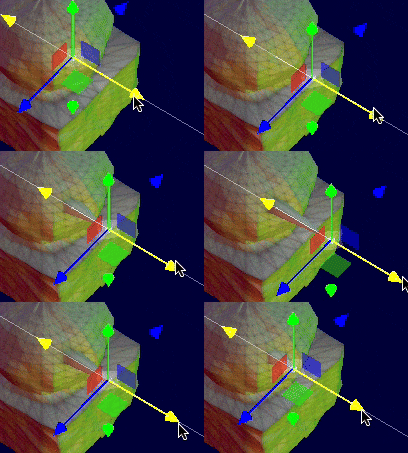
I added another method to clampVertexWithinBoundingBox. I reused some of the original logic to clamp the dimensions of the modelObject, but I’m finding that the selected vertex is still escaping the bounding box. The good news is that dynamic textures are updated as the vertex moves.

It feels a little choppy since the model changes a little while after the controls are moved. The cameras orbit controls is sometimes disabled when the page first loads, and changing selected indexes doesn’t always change the position of the transform controls. Still… progress.
I’ve got everything wired up.
Now that the vertex can be moved in the scene, I don’t have a major feature I want to add at the moment. I’ve learned most of the basics. I think I’m at a stopping point. One where I can drop what I’m working on and move onto another technology being used in my game. I’ve been wanting to move onto data communication for a few days now.
One response to “Moving A Vertex”
[…] The goal of 5 KB is that it is sufficient enough to send small files like those needed in my little Web Based 3D Model Editor. The 3D Models are composed of 1024 vertices with 3 bytes each. at 3 KB (uncompressed), that leaves […]