Yesterday I was able to encode a byte of data with two separate frequencies. I also setup an audio analyzer to graph out frequencies heard by a microphone, detect the two separate frequencies, and build a binary string from the signals received given that they meet a certain threshold of amplitude. Unfortunately, the isolation didn’t detect the original data that was sent. Let’s see if we can address this today.
I was reviewing some code from cwilso / PitchDetect (js/pitchdetect.js line 287) where they correlate the buffer of audio and isolate tones. They also passed some configurations when getting access to the microphone to disable echo cancellation, auto gain control, noise suppression, and a high pass filter. Let’s work with that first and see what effect it has.
navigator.mediaDevices
  .getUserMedia({
    audio: {
      mandatory: {
        googEchoCancellation: false,
        googAutoGainControl: false,
        googNoiseSuppression: false,
        googHighpassFilter: false
      },
      optional: []
    }
  })
Before jumping ahead with this, it looks like these are specific to Google Chrome web browsers. It looks like I can call a function to get supported constraints.
MediaDevices.getSupportedConstraints()
// Uncaught TypeError: MediaDevices.getSupportedConstraints is not a function
MediaDevices
// f MediaDevices() { [native code] }
MediaDevices().getSupportedConstraints()
// Uncaught TypeError: Illegal constructor
MediaDevices()
// Uncaught TypeError: Illegal constructor
new MediaDevices()
// Uncaught TypeError: Illegal constructor
How on earth do you get these constraints? I looked at the documentation for getSupportedConstraints. It turns out that you need to grab the value directly off of the navigator object.
navigator.mediaDevices.getSupportedConstraints();
{
    "aspectRatio": true,
    "autoGainControl": true,
    "brightness": true,
    "channelCount": true,
    "colorTemperature": true,
    "contrast": true,
    "deviceId": true,
    "displaySurface": true,
    "echoCancellation": true,
    "exposureCompensation": true,
    "exposureMode": true,
    "exposureTime": true,
    "facingMode": true,
    "focusDistance": true,
    "focusMode": true,
    "frameRate": true,
    "groupId": true,
    "height": true,
    "iso": true,
    "latency": true,
    "noiseSuppression": true,
    "pan": true,
    "pointsOfInterest": true,
    "resizeMode": true,
    "sampleRate": true,
    "sampleSize": true,
    "saturation": true,
    "sharpness": true,
    "suppressLocalAudioPlayback": true,
    "tilt": true,
    "torch": true,
    "voiceIsolation": true,
    "whiteBalanceMode": true,
    "width": true,
    "zoom": true
}
This is more than just audio. Here is what I think I’m interested in:
{
    "autoGainControl": true,
    "echoCancellation": true,
    "noiseSuppression": true,
    "suppressLocalAudioPlayback": true,
    "voiceIsolation": true,
}
Did that work? I think so. Each time I send a signal, I’m getting the same incorrect response. Yes – incorrect, but the same! And only when it’s sent.
| Letter | Binary | Received |
|---|---|---|
| A | 01000001 | 0 [10][10][10][10][10][10][10][10] [10][10][10][10][10][10][10][10] [10][10][10][10][10][10][10][10] [10][10][10][10][10][10][10][10] [10][10][10][10][10][10][10] 00 [10][10][10][10][10][10][10][10] [10][10][10][10][10][10][10][10] [10][10][10][10][10][10][10][10] [10][10][10][10][10][10][10] 111 |
| a | 01100001 | 0 [10][10][10][10][10][10][10][10] [10][10][10][10][10][10][10][10] [10][10][10][10][10][10][10][10] [10][10][10][10][10][10][10][10] [10][10][10][10][10][10][10][10] [10][10][10][10][10][10][10][10] [10][10][10][10][10][10][10][10] [10][10][10][10][10][10][10][10] [10][10][10][10][10][10][10][10] 111 |
| w | 01110111 | 0 [10][10][10][10][10][10][10][10] [10][10][10][10][10][10][10][10] [10][10][10][10][10][10][10][10] [10][10][10][10][10][10][10][10] [10][10][10][10][10][10][10][10] [10][10][10][10][10][10][10][10] [10][10][10][10][10][10][10][10] [10][10][10][10][10] 111111111111111 |
Let’s see if we can address the duplicate pairs where both the high and low signal are received. I think I want to compare the threshold of each, and pick the higher of the two.
  function canHear(hz) {
    var length = (audioContext.sampleRate / analyser.fftSize);
    var i = Math.round(hz / length);
    return frequencyData[i] > FREQUENCY_THRESHOLD;
  }
  function amplitude(hz) {
    var length = (audioContext.sampleRate / analyser.fftSize);
    var i = Math.round(hz / length);
    return frequencyData[i];
  }
  var high = canHear(FREQUENCY_HIGH);
  var low = canHear(FREQUENCY_LOW);
  if(high || low) {
    listen += amplitude(FREQUENCY_HIGH) >
        amplitude(FREQUENCY_LOW) ? '1' : '0';
  } else {
    if(listen !== '') {
      receivedDataTextarea.value += listen + '\n';
      receivedDataTextarea.scrollTop = receivedDataTextarea.scrollHeight;
    }
    listen = '';
  }
That’s working out great. Here are some samples for lower-case letter “A”:
| Binary | Received |
|---|---|
| 0 11 0000 1 | 00000000000 1111111111 00000000000000000000000000 11111111111111111111111111111 |
| 0 11 0000 1 | 00000000000 11111111111 00000000000000000000000000 11111111111111111111111111111 |
| 0 11 0000 1 | 00000000000 11111111111 00000000000000000000000000 11111111111111111111111111111 |
| 0 11 0000 1 | 0000000000 11111111111 00000000000000000000000000 11111111111111111111111111111 |
Something is definitely going on here. Although the beginning and trailing signal seems a bit off. Let’s try an ASCII letter with an even number of bits on and off. 01010101 is the upper case letter “U”.
| Bits | Received |
|---|---|
| 0 1 0 1 0 1 0 1 | 00000000000 111 000000000 111 00000000 1111 00000000 11111111111111111111111111111 |
| 0 1 0 1 0 1 0 1 | 0000000000 1111 00000000 11111 0000000 1111 00000000 111111111111111111111111111111 |
| 0 1 0 1 0 1 0 1 | 00000000000 1111 00000000 1111 00000000 1111 00000000 1111111111111111111111111111111 |
| 0 1 0 1 0 1 0 1 | 0000000000 11111 0000000 11111 0000000 11111 0000000 1111111111111111111111111111111 |
| 0 1 0 1 0 1 0 1 | 00000000000 1111 00000000 1111 0000000 11111 00000000 111111111111111111111111111111 |
I’m definitely seeing something! What’s interesting is that the low signal at 1200Hz (7-9 bits) is being picked up more often than the high signal at 900Hz (3-5 bits). My oscillator is sending each one for 100ms. And then there is the initial and final bits – why are they so long? Does the analyzer ramp up/down when listening to frequencies?
Let’s attack the first problem. We’ve got a lot of duplicate bits. We need to construct the bits based on duration instead of each animation frame.
  var high = canHear(FREQUENCY_HIGH);
  var low = canHear(FREQUENCY_LOW);
  if(high || low) {
    const now = performance.now();
    if(bitStarted) {
      if(now - bitStarted > FREQUENCY_DURATION) {
        bitStarted = now;
        received(amplitude(FREQUENCY_HIGH) > amplitude(FREQUENCY_LOW) ? '1' : '0');
      } else {
        // same bit
      }
    } else {
      bitStarted = now;
      received(amplitude(FREQUENCY_HIGH) > amplitude(FREQUENCY_LOW) ? '1' : '0');
    }
  } else {
    if(bitStarted) {
      bitStarted = undefined;
      received('\n');
    }
  }
Well this is cool. I can now watch the bits as they are received.

Transferring data at 10 baud, I’m receiving more bits than I am sending, and the data received is not always accurate. Maybe I need to keep re-evaluating the current bit for the duration and take the strongest signal overall instead of the first bit. After all, sign-waves have their peaks and valleys. Who’s to say I’m not picking up on a valley? Although, doesn’t the analyzer already account for this to detect the frequency?
Well, that didn’t exactly work. As the signal was evaluated, I store the amplitude of both the high and low frequencies in an array. Once the frequency duration passed, I summed up the amplitudes to determine which bit was received. I mostly got a bunch of zero’s ending with a cluster of ones.
const sum = (total, value) => total + value;
function evaluateBit(highBits, lowBits) {
  return highBits.reduce(sum, 0) > lowBits.reduce(sum, 0) ? '1' : '0';
}
- 000100011111
- 000000011111
- 000000011111
- 000000011111
- 000000011111
- 0000000011111
For an alternating 01010101 bit stream, this wasn’t good. Well, maybe the amplitude doesn’t come through as well based on where on the spectrum it is. Let’s try seeing which value wins between the two for each round, and display the overall winner of all the rounds.
function evaluateBit(highBits, lowBits) {
  let highCount = highBits.reduce(
    (count, highAmplitude, i) =>
      count += highAmplitude > lowBits[i] ? 1 : 0
    , 0
  );
  return highCount >= (highBits.length / 2) ? '1' : '0';
}
- 000000011111
- 000001011111
- 100000011111
- 000000011111
- 000001011111
- 000000011111
I’m seeing similar results again. Lots of zeros at the start, ending with lots of ones. Maybe the analyzer isn’t running fast enough. I’m getting about 3-5 samples. Maybe if I increased the duration to 200 ms?
That was a major improvement. At 5 baud… it’s accuracy is getting better.
| Letter | Bits | Received |
|---|---|---|
| U | 01010101 | 01010101111 |
| U | 01010101 | 0101010111 |
| a | 01100001 | 01100001111 |
| a | 01100001 | 0110000111 |
| b | 01100010 | 11100010000 |
| b | 01100010 | 00100010000 |
| c | 01100011 | 0010001111 |
| c | 01100011 | 1110001111 |
We still have horrible trailing bits with our signal, but some of our other bits are still not coming through correctly. Let’s increase the bit duration to 400ms.
U 01010101
U 01010101
a 01100001
a 01100001
A 01000001
A 01000001
W 01010111
W 01010111
w 01110111
w 01110111
b 01100010
b 01100010
010101011
110101011
011000011
111000011
110000011
110000011
010101111
0101011111
0111011111
0111011111
0110001000
011000100
It’s almost near perfect now, except for the extra bits on the end. Maybe the audio analyzer doesn’t exactly start when the bit starts, and ends up starting in the middle of a bit signal. That would explain an extra bit at the end – but not two extra bits. It’s almost like I need to synchronize the audio analyzer with the signal. Do I need something like a clock cycle to proceed my messages? Maybe the drawing of the graph is slowing things down as well. Let’s stop drawing.
Hmm… not much of a difference. At 400ms per bit, we are getting 23 to 25 samples regardless of drawing. How about this. Increase the fftSize? We are currently at 2 ** 12. What if we bump it up to 15? Well, now we get the same exact bits (almost) with an extra bit at the beginning, and an extra bit at the end.
U 01010101
U 01010101
a 01100001
a 01100001
b 01100010
b 01100010
0010101011
0010101011
0011000011
0011000011
0011000100
0011000000
How am I determining when the next bit is processed?
Watching the bits being drawn out in real-time, I’m noticing that the bits are still being added after the audio has stopped playing. Maybe I need to increase my threshold. Nope – that degrades the quality of recognizing what bits were sent. The audio context, or the visualizer needs some way to calculate the frequencies such as a duration or number of samples to take before determining the frequencies sampled. Let’s see if either one offers anything that can help make the window of time smaller.
It looks like the Analyser Node has a smoothing time constant to make “the transition between values over time smoother”. I don’t want smooth values. I want as close to the real deal as possible. Let’s see if setting that has any effect. By default, the value is 0.8. 0.8 what? Seconds? Let’s see what happens if we set it to zero. It didn’t seem to have any effect.
It talks about frames. Is there a way to increase the frames? The Audio Context has a few interesting things. There are read-only properties for base and output latency in seconds. Let’s see what it says for me.
| Latency | Seconds |
|---|---|
| base latency | 0.005333333333333333 |
| output latency | 0 |
5ms isn’t that bad. I don’t think that’s what I’m looking for. It doesn’t have much else on it. Maybe our problem is with the microphone itself via getUserMedia or how we turn it into a source via createMediaStreamSource. Creating a media stream source doesn’t accept any special parameters other than the media stream itself, and returns a Media Stream Audio Source Node. The media stream audio source node doesn’t have any special properties other mediaStream. It inherits from AudioNode. I’m not seeing anything with sampling or frame rates. I see things like channel count, number of inputs, number of outputs, etc. Let’s go back to how we get the microphone via navigator get user media. I’m still not seeing anything of use. I’m under the impression that I have everything that is available to me.
I’ve got a few meetings tonight, so I need to sign off from here. Here is a video of the app in action with all of the sounds.

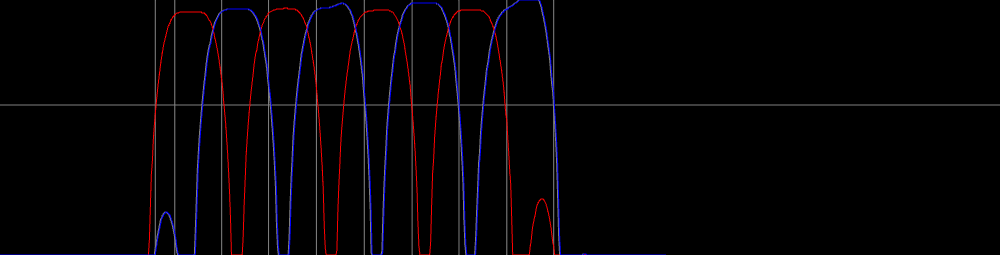
And just before I go, I graphed the amplitude of the High/Low frequencies over time as well as vertical lines when each bit begins/ends on the graph. The threshold is the horizontal line. I bumped the threshold up to 150. That last bit (the extra one) is vary narrow as the frequency drops. In fact, all frequencies here have curves. It’s not an instant on/off. it seams like our starting bit needs to start a little later. More on this tomorrow…

Well, I’m back. Let’s continue where we left off.
At the last minute, I decided to graph the amplitude of the low and high signals over time. It paid off since there was a lot of information revealed as to what the audio analyser was picking up. It seems like it’s averaging out a frequency over time, and so I see a build up of a frequency before it reaches its peak, as well as a gradual fall off. I decided to raise my threshold since both frequencies were getting to full amplitude after all. This resulted in the first bit from being dropped off of my received signal. I still have the extra bit at the last part of the signal. From what I see, the signal disappears long before the duration of a full bit has taken place. I need to exclude bits that don’t last for the full duration.

It’s working! The whole thing is working! What’s even really cool is that I can talk and sing during the transfer of data and my voice is ignored.

This is awesome. I now need a way to git rid of those curves. I want the analyzer to tell me if the signal is on or off. I don’t want an average duration over time. From what I’m seeing, the fftSize is directly correlated to this. Let’s reduce our value to the power of 10.

Well holy smokes! That’s exactly what I was looking for. Can we speed it up?

Yes, but no. The last bit is dropped off. Maybe I need to adjust the threshold for that last bit. It turns out that there just weren’t enough samples. Dropping below 180 ms for a bit is causing a problem with the last bit. It brings about 11 samples on average for each bit.
If it takes me 180 ms to transfer a bit, that is roughly 5.55 bits per second that I can transfer. To transfer 600 bits per second, I would need to pair up 120 frequencies. It seems possible, but uncertain. Let’s keep working at the problem. Maybe something will come to light.
I added a few inputs to modify the signal processing during runtime. It helps with fine tuning.

I’ve added a bit more fields to configure and mess around with the data being transferred/received. I also setup the frequency graph to show less data samples. Although it moves much faster now, I can see something is going on with the timing. By time we get to the last bit, our bits seem to have fallen behind the timing. The last bit starts halfway in the previous segment, and falls off a bit too short to qualify as the last valid bit.

I think I know what the problem is. I’m starting the timer over again instead of basing the timer on when the first bit started.

Now that’s much better! The last bit lines up just as well as all the previous bits. Now that I’ve got the timing down, lets see if we can reduce the time it takes to transfer a byte. Let’s reduce it from 190ms to 100ms.

The integrity of data is being corrupted. I’m getting double signals at the start. The end of the signal seems to be extra long as well. Let’s reduce the samples to expand this to be a bit wider.

Although it’s not an issue, where is that third grey line coming from? Ah, it was from the previous frame. I needed to begin a new path before drawing the horizontal threshold. I also made the bit segments green. Let’s look at U 01010101 sending me 001010101:

Somehow there is a short span at the beginning as both the high and low frequencies are ramping up. I added the ability to pause the graph after the signal is received. Here are 100 data points for 01010101. It looks like we went below our threshold with the red in that small section, but blue is still at the top.

Something must be off with how the bit index is calculated based on the time that passed since the first bit started. Well… yes. That was it. I was subtracting the wrong values. I swapped the two values to get a positive duration.
 var totalDuration = now - bitStarted;
 var bitIndex = Math.floor(totalDuration / FREQUENCY_DURATION)

Okay. Now we have our starting duration fixed up – I think? Although the graph doesn’t look exactly like it’s separated evenly by time. Also, that extra bit looks like its too short to qualify as a bit.

I’m getting a bit tired. I have a meeting at the center for the arts tomorrow, so I should probably get some rest for it. I’m happy with the progress I made today. I’m able to detect a byte of information and see a visual graph of the signal coming through. Currently the issue seems to be timing. I have some short term goals.
- Display data as time rather than how many samples were captured.
- Get data stable enough to be reliable
- Send bits on multiple frequencies at the same time