I was able to setup Multi-Frequency Signaling with the app yesterday, allowing me to increase the data-transfer speed around 300 to 500 baud based on the frequency spectrum that was used, the duration of each signal, and the FFT size.
function getChannels() {
  var audioContext = getAudioContext();
  const sampleRate = audioContext.sampleRate;
  const fftSize = 2 ** FFT_POWER;
  const frequencyResolution = sampleRate / fftSize;
  const channels = [];
  const pairStep = frequencyResolution * 2 * FREQUENCY_RESOLUTION_MULTIPLIER;
  for(let hz = MINIMUM_FREQUENCY; hz < MAXIMUM_FREQUENCY; hz+= pairStep * 2) {
    const low = hz;
    const high = hz + frequencyResolution * FREQUENCY_RESOLUTION_MULTIPLIER;
    if(low < MINIMUM_FREQUENCY) continue;
    if(high > MAXIMUM_FREQUENCY) continue;
    channels.push([low, high]);
  }
  return channels;
}
I was sending the same bit value across all frequency pairs. Today we need to make use of the whole spectrum to send individual bits so that we can send all of the characters of a whole sentence in a short period of time, rather than eight individual ones and zeros making up a character.
The last thing I did was to convert all of the text into ones and zeros to be sent. However, each bit is still being sent to all available channels rather than one bit per channel. My sample text is 12 characters as “Hello World!”. At 100ms, this takes 9.6 seconds to send the whole message one bit at a time. I have a frequency range between 5 kHz and 10 kHz with a frequency resolution of 46.88, and a multiplier of 2 providing me with 14 channels available. I could potentially reduce the transfer speed to 0.7 seconds in this configuration.
| Text | Bit String |
|---|---|
| Hello World! | 01001000 01100101 01101100 01101100 01101111 00100000 01010111 01101111 01110010 01101100 01100100 00100001 |
I changed the script to create my array of channel oscillators first. Then I looped through each bit and iterated through each channel to send bits across different channels. After looping through the bits, I looped through the channels one last time to stop all signals from being sent.
function sendBits(bits) {

  // display what is being sent
  sentDataTextArea.value += bits.join('') + '\n';
  sentDataTextArea.scrollTop = sentDataTextArea.scrollHeight;

  var audioContext = getAudioContext();
  const channels = getChannels();
  const oscillators = [];
  const channelCount = channels.length;
  var duration = Math.ceil(bits.length / channelCount) * FREQUENCY_DURATION;

  // create our oscillators
  for(let i = 0; i < channelCount; i++) {
    var oscillator = audioContext.createOscillator();
    oscillator.connect(audioContext.destination);
    oscillators.push(oscillator);
  }

  // change our channel frequencies for the bit
  for(let i = 0; i < bits.length; i++) {
    const isHigh = bits[i];
    const channel = i % channelCount;
    const segment = Math.floor(i / channelCount);
    var offset = ((segment * FREQUENCY_DURATION)/1000);
    oscillators[channel].frequency.setValueAtTime(
      channels[channel][isHigh ? 1 : 0],
      audioContext.currentTime + offset
    );
  }

  // silence oscillators after signal completes
  for(let i = bits.length; i < bits.length + channelCount; i++) {
    const channel = i % channelCount;
    const segment = Math.floor(i / channelCount);
    const offset = ((segment * FREQUENCY_DURATION) / 1000);
    oscillators[channel].frequency.setValueAtTime(
      0,
      audioContext.currentTime + offset
    );
  }

  // start the graph moving again
  resumeGraph();

  // start sending our signal
  oscillators.forEach(o => o.start());

  // stop the oscillators after it the data has been sent.
  window.setTimeout(function() {
    oscillators.forEach(o => o.stop());
  }, duration);
}
It sounded like a bunch of noise. Not white noise. It was robotic in how it sounded.
| Text | Sent | Received |
|---|---|---|
| H | 01001000 | 01001000 |
| e | 01100101 | 01100101 |
| l | 01101100 | 01101100 |
| l | 01101100 | 01101100 |
| o | 01101111 | 01101111 |
00100000 | 00100000 | |
| W | 01010111 | 01010111 |
| o | 01101111 | 01101111 |
| r | 01110010 | 01110010 |
| l | 01101100 | 01101100 |
| d | 01100100 | 01100100 |
| ! | 00100001 | 00100001 |
01 |
It all came through along with some extra bits. Where did they come from? I sent 12 characters consisting of 96 bits across 14 channels with 17 segments at 60ms each. 96 is not evenly divisible by 14. The last segment would have consisted of 12 bits (96 % 14 = 12). We have found where our phantom bits came from. I thought I had addressed this by changing the unused oscillator frequencies to 0 Hz. I don’t see a fall off of the two frequencies in the segment prior to the end. Perhaps I can’t use 0 Hz.

I changed the frequency to 500 Hz, but the last two channels are not dropping when expected. I’ve changed the graph so that the last two channels are more prominent. They are not falling off until the signal has completed.

Could this be another frequency bleeding over across the spectrum? I’m noticing that my frequencies do not drop off to zero until the signal ends. Let’s try increasing the frequency resolution multiplier. This reduces my channels down to 9 and I’ll have 3 phantom bits.

Something still isn’t rite. I expected a shaper drop-off for the last segment of the phantom bits. I’m modified the code to start/stop oscillators at a specific time based on the audioContext.
// silence oscillators when done
for(let i = bits.length; i < bits.length + channelCount; i++) {
  const channel = i % channelCount;
  const segment = Math.floor(i / channelCount);
  const offset = ((segment * FREQUENCY_DURATION) / 1000);
  oscillators[channel].stop(currentTime + offset);
}
And based on this, my channels are stopping at the following:
| Channels | Stop |
|---|---|
| 12 to 13 | 0.36 |
| 0 to 11 | 0.42 |
So they stop… but the analyzer still don’t show a sharp drop-off for the last two channels in the last segment. I keep thinking this has to do with frequency bleed over from the other nearby frequencies I’m using in the spectrum.
Yes! If I increase the frequency resolution multiplier up to 6, I see the drop off of the (now 4) phantom bit channels. I only have 5 channels available. 96 % 5 = 1, so the remaining 4 channels have stopped.

Multiplying the frequency resolution by 5 isn’t helpful as I have 6 channels available and evenly divides 96. Setting the multiplier to 4 gives me the same phantom bits as before. Let’s try a different length of characters to cause phantom bits for multiplying the frequency by 5.

Yes. Five works as well. It’s not as sharp of a drop off, but it’s still dropping. If I don’t want to count phantom bits, but want to keep my speed up, I may need to send a header indicating how many bits are being sent in the stream (aka packet).
How big should my packets be? If I keep them small (255 bits or less), I can send 8 bits. I can say that the packet size represents a number of bytes instead – so 0 to 255 bytes (2040 bits). Sending a 0 is pointless, so we can bump it to represent 1 to 256 bytes (2048 bits). Let’s bump it up to 10 bits to represent 1 to 1024 bytes of data being transferred. If we have too large of a number, we may be waiting a bit too long to transfer the data only to find out that we wasted time after the data didn’t come through properly and has to be retransmitted. Every bit that I have to add reduces the amount of “real” data transfer speeds. Data over audio is slow…
function sendBits(bits) {
  const byteCount = bits.length / 8;
  if(bits.length === 0) {
    logSent('No bits to send!');
    return;
  } else if(bits.length % 8 !== 0 || bits.length === 0) {
    logSent('Bit count must be divisible by 8.');
    return;
  } else if(byteCount > (1 << PACKET_SIZE_BITS)) {
    logSent(`Can not transfer more than ${(1 << PACKET_SIZE_BITS)} bytes.`);
    return;
  } else {
    logSent(bits.join(''));
  }

  const packetLength = ((byteCount - 1) >>> 0)
    .toString(2)
    .padStart(PACKET_SIZE_BITS, '0')
    .split('')
    .map(Number);
  bits.unshift(...packetLength);
Sending one byte as the letter “U”, our packet is 000000000001010101. More than double the size for one byte of data, but most of our packets are going to be much larger.

On the receiving end, we need to read the packet length header, ignore channels with phantom bytes, and change our proposed end-time once we have all the bits to determine the duration of the full packet. From this, we can get rid of that narrow segment at the end that gets dropped, and remove the “Last Segment Percent” setting in our UI.
Well… I’m reading the packet header for the data length. It’s unstable. The bits are not often what I expect them to be. Increasing the frequency multiplier sometimes helps, but sometimes doesn’t. Sending 4 characters has a data byte count ranging from 2-4 bytes.

This is very unstable. I think I need to look into data correction. Unfortunately, this is going to add significantly more bits into my packets for redundancy, but it appears to be a necessity. I’m seeing algorithms for Reed-Solomon codes, Hamming codes, and convolutional codes.
Reed-Solomon looks like a bunch of complex math. Let’s go onto Hamming codes. It looks like Hamming codes are beneficial to noisy transmission, but at a high cost of almost doubling your data size in parity bits. It looks like I can implement it with a few lines of Javascript. Let’s look into convolutional codes before moving forward. Convolutional codes looks like it’s getting into some heavy math again. The Hamming code gets complex math as well on Wikipedia.
I had to step away for a meeting, but I’m back. I implemented the Hamming code. I’m not sure if it’s all that effective. It turns out that the Hamming code uses bitwise operations on three parity bits to ensure that four bits (a nibble) have the correct value. You’re inflating your data stream by 75% to support error correction.
function nibbleToHamming(nibble) {
  if(nibble.length !== 4) return [];
  return [
    nibble[0] ^ nibble[1] ^ nibble[3],
    nibble[0] ^ nibble[2] ^ nibble[3],
    nibble[0],
    nibble[1] ^ nibble[2] ^ nibble[3],
    nibble[1],
    nibble[2],
    nibble[3]
  ]
}
function hammingToNibble(hamming) {
  if(hamming.length !== 7) return [];
  const error_1 = hamming[0] ^ hamming[2] ^ hamming[4] ^ hamming[6];
  const error_2 = hamming[1] ^ hamming[2] ^ hamming[5] ^ hamming[6];
  const error_3 = hamming[3] ^ hamming[4] ^ hamming[5] ^ hamming[6];
  // 0, 2, 3, 4, 5
  let error = (error_3 << 2) | (error_2 << 1) | error_1;
  if(error !== 0) {
    // don't mutate the array
    hamming = hamming.slice();
    hamming[error - 1] ^= 1; // flip
  }
  return [
    hamming[2],
    hamming[4],
    hamming[5],
    hamming[6]
  ];
}
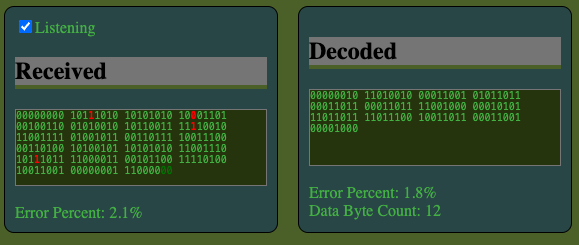
It was hard to tell what was going on with so many bits as well as the decoding, so I started highlighting bits that didn’t match. What’s really cool is watching the data come through. On top of that, I also added a percent of errors to see if the error correction was improving the data stream or not. Does it work? Yes. If one of the bits is incorrect out of a 7 bit block, the data can be recovered.

Does it always work? No. If two or more bits out of seven are wrong, the data can not be recovered.

How bad can it get? Bad. My signal seems to have a lot of bad bits most of the time. I’m uncertain if its simply an issue of trying to find the best frequency range and division, and/or if the duration of the bits has something to do with it. If I’m having an error on average for every 8th bit (12%) in the decoded, then statistically none of my bytes will be valid. With error correction, I can only afford failing one out of every 7th bit (14%). The error correction algorithm I have makes it worse in noisy environments, increasing the risk of failure and time.
It feels like on average, I have between 20 to 30% errors.

I’m also noticing that I’m recording some samples often enough to see the wave forms within each segment rather than a steady horizontal line.

I think the best approach is to find a configuration of frequencies/resolutions that can improve the stability of the signal with a less than 14% error rate on average before I introduce error code correction. The good news is that I have a checkbox where I can disable/enable the error correction.
Here is a configuration that seems to be promising:

I think its going to help if I can write out the frequencies on each channel, and somehow watch the values come in – like the strength of a 1 or 0 on that channel. Perhaps I should write out the number of Hz between each channel, sort of like I write out the frequency resolution.
Well, that sort of revealed something. I was applying my multiplier twice, but not separating low/high channels as much as I should have. Channels are evenly spaced apart now.

With all of the channels having two lines each, I need something in addition to the frequency graph to see how data is coming across individual channels as high/low and amplitude. Maybe it will reveal that some channels are better than others – especially if I can identify the error rate for individual frequencies.
Atari 410 Program Recorder
Just as a side note, I’m seeing that generic audio cassette tapes can generally go up to 12 kHz for audio. Given that my first computer drive was a cassette drive that used audio cassette tapes, this peaks my interest and gives me a general idea on narrowing down the audio range it had used. The Wikipedia article for the Atari Program Recorder confirms that it ran at 600 bits per second (600 baud), but confirms that error detection and gaps reduced the transfer speed to 550 bits per second. I’m running into the same thing myself stating packet sizes. Instead of error detection, I added error correction. It seems they used packet checksums, which was something I was also considering on the horizon once I got past error correction and a stable signal. I was thinking of CRC32, but they pulled it off with one byte instead of four.
Left audio channel could send music to the TV. Yes… I remember that. I recorded over some of my music cassette tapes. The music was still there, but hat a muffled sound to it that faded in and out, and there was an annoying ringing tone every few seconds. As a kid, I had assumed the ringing sound was the data itself being loaded.
Ah hah! The system also used Frequency Shift Keying (FSK). It had four channels. Wow. Just four?
| Channel | Hz | Bit Value |
|---|---|---|
| Mark | 5327 | 1 |
| Space | 3995 | 0 |
| Clock | 600 |
A space bit (3995 Hz) was followed by a byte (8 bits), followed by a mark (5327 Hz).
| Type | 1 | 0 |
|---|---|---|
| Mark | 5327 | N/A |
| Bit 0 | 5327 | 3995 |
| Bit 1 | 5327 | 3995 |
| Bit 2 | 5327 | 3995 |
| Bit 3 | 5327 | 3995 |
| Bit 4 | 5327 | 3995 |
| Bit 5 | 5327 | 3995 |
| Bit 6 | 5327 | 3995 |
| Bit 7 | 5327 | 3995 |
| Space | N/A | 3995 |
Fascinating. Data was split into packets of 128 bytes along with 3 header bytes and a checksum at the end. Regardless if data included the full 128 bytes of data or not, packets were padded out to be 132 bytes long. With prefix/suffix of marks and spaces, a byte was effectively padded out to 10 bits making a packet of 132 bytes consisting of 1,320 bits instead of 1,056. The clock recovery was used specifically for tapes that could stretch over time. I can see why they used the alternating bits for that. Apparently eight alone isn’t enough, or the machine needed extra time to adjust for the first byte. There is also a pre record write tone before a packet, and a post record gap after the packet. Normal Inter-Record Gap (IRG) allows for 1 second of travel as the tape stops after each packet.
| Type | Packet | Bytes | Normal IRG Seconds | Short IRG Seconds | Data |
|---|---|---|---|---|---|
| Pre Record Write Tone | 3 | 0.25 | Mark 5327 Hz | ||
| Header | Clock Recovery / Speed Measurement | 2 | 01010101 01010101 | ||
| Header | Control Byte | 1 | Data Size or EOF | ||
| Data | Data | 128 | Data | ||
| Footer | Checksum | 1 | |||
| Post Record Gap | 1 | 0 to N | Unknown Tones | ||
| Total | 132 | 4 | 0 to N |
I’m already using a 10 bit number as the control byte. It may be ideal to drop it down to 8 so that it plays nicer with the error correction. I’m currently padding two bits on the end of my data stream.
What is the checksum? I found another article with more details on the Atari 410 cassette drive on Atari Archives. It seems that the checksum is just a sum of all bytes in the packet, including the headers – sum + byte + result. Something like the following reducer:
const checkSumByte = packetBytes.reduce(
  (sum, byte, i) => i === 131 ? sum : (sum + byte) % 256
, 0);
That seams fairly simple to do. File structure seams fairly simple as well.
| Leader | 20 seconds | Mark 5327 Hz |
| Packets | 1 to N | |
| End of File Packet | 1 |
Cool. The tape travels at 1 and 7/8 inches per second, and uses a quarter of the width to store data on the right track/channel.
In summary, it looks like the Atari 410 Cassette Drive only used two frequencies to identify on/off bits with the Mark 5327 Hz and Space 3995 Hz frequencies, and was able to achieve speeds of 600 bits per second. That is 0.6 milliseconds per bit. With JavaScript’s setInterval function in the browser, I um unable to get the function to be called less than every 3 milliseconds. I can’t get close to those speeds to process a bit in the same duration. I definitely need to use more frequencies to come close to the speed. I’m just a bit shocked that they could read bits that fast. I think the computer was running at 1.7 MHz. At 0.6 milliseconds per bit, that’s about 1 million CPU cycles of 6502 instructions.
Now… this is interesting. I’m using something close to those two frequencies. 3995 and 5120 Hz – at 10 milliseconds. 10! And it seems like the error percentage is at zero most of the time. I’m not even using error correction.


And error correction actually works almost all the time now since I don’t have multiple bits failing in the same hamming/nibble. Although it seems my error percents are off.

It’s getting a bit late. Saturday is free comic book day as well as May the 4th. My friends who own Main Street Geek are expecting me to pay a visit as well as a friend over at the Stone Branch Center for the Arts. I may bring Teddy with me. Other than that, I think my day is free to work on the audio transfer project.

I just had a thought. Maybe I should choose the middle frequency of each analyzer frequency resolution. If I’m picking something on the end, it may be bleeding into both values.