My last post, Drawing Hands, a Pi That Said No, and a $2 Camera Named Ghost Jack, ended a little after 1 AM on Monday. This one covers Monday, November 9. The rule is the same as before: the agents wrote nearly all of the code, Codex and Claude on my Mac and Kaylee reviewing on hers. I decided what to build, plugged things in, listened, and said what looked wrong. Most of this day was spent on things I could see or hear on the desk: a camera reading a screen in the dark, a speaker making a sound from a bare-metal kernel, and a row of little screens.
Ghost Jack watches at night
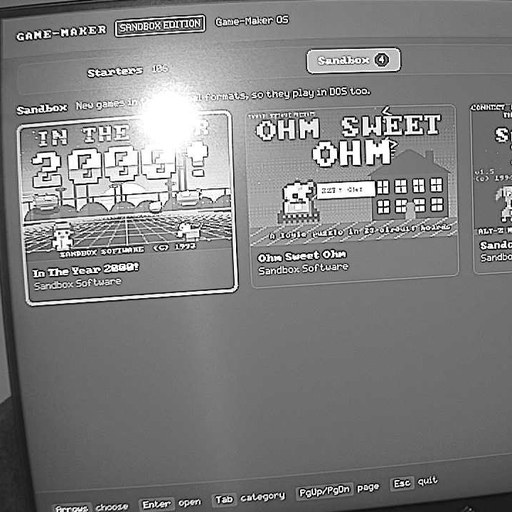
With the room lights off, I left Ghost Jack pointed at the monitor that shows the Pi’s Game-Maker OS games list. The camera’s infrared view still reads it. The bright spot on the screen is the camera’s own infrared light bouncing back at it.

An agent then added a command, npm run look, that grabs a snapshot and runs it through text recognition. It reads real words off that screen, noisily: “Game-Maker Bizarre Other … SANDCASTLE … Snowbound: The Shovel … Ohm Sweet Ohm Year 2800! Esc quit page Enter open”. The chunky pixel font reads best at about the size the camera sees it. Enlarging it three or four times made it worse. That “Year 2800” is the game In The Year 2000!, which tells you how far to trust it, but it is enough for a script to check that a screen says what it should.
The camera rebooted once overnight. Its clock fell back to 1971 and the bridge signed back in on its own. A later shot looked at the bench, where the three CYD boards sit on a plywood panel next to the Pi’s e-ink display.

The same night turned up a small thing about the CYDs: opening a board’s serial port normally restarts it, but on my Mac setting the DTR and RTS lines low first stops that. That became a no-reset serial option in the board tools. By the end of the morning Ghost Jack 0.1.2 was released, and it picked up a Vision mode (Auto, Night, Color) after that.
Meanwhile on Facebook
At 10:01 Monday morning I posted about Ghost Jack on Facebook, with many photos of the setup and what the camera saw. This is what I wrote:
Ghost Jack is a cyberpunk-themed gateway that lets AI agents interact with the meatspace to control a $2 security camera from a thrift store. A persona known as Glassmouth serves as an old, retired switchboard operator who queues requests from different agents to move the camera and capture snapshots, live feeds, or time-lapse stills. The agents can specify a few preset positions to pan, tilt, and zoom in the camera. They can also speak via text-to-speech to give information or ask multiple-choice questions. Glassmouth transcribes my responses. When programming an operating system on bare metal without Linux, e-Ink displays, and CYD devices, I’ve automated myself out of the process loop of confirming visual observations that don’t require my cognitive abilities or user-accessibility experience. I’ve included a few shots of overnight testing that it captured. It can also create 350-degree panoramic spheres on its own. It’s not perfect yet, but I plan to bring it to a park and get some nice shots once it’s ready, similar to how I used AutoStitch 20 years ago!

The camera is in its own repository, ghostjack.
The Pi: its first sound, saves, and a keyboard
The big one was at about 3 in the afternoon. The bare-metal kernel, with no Linux under it, played its first sound: a quiet 440 Hz test tone through HDMI to the speakers on the second Pi Zero W’s monitor. I heard it. The path is the kernel’s mixer, then HDMI audio frames, then the HDMI audio FIFO fed by DMA. It is a tone, not a game yet, but it is the first step toward hearing the games on the Pi. The next steps are game sounds: the PC speaker, the sampled voice files and the FM music.
The same day the kernel was renamed sandbox-kernel and got a boot panel on HDMI, and Game-Maker OS got its castle boot splash with a yellow comet that runs around it and its own title page on the e-ink display.

Some of the rest of the Pi’s day:
- Game-Maker OS was rejected by its own kernel. On the second Pi it was too big: one new feature pushed it past the kernel’s 8 MiB image quota. A fix brought it to 7.89 MiB, and the build now checks its size against the quota.
- Save and load. F5 and F6 work in Game-Maker OS now, the same keys as the original PLAYGAME, with saves kept per game.
- Pi 1 caught up. It was running an old Game-Maker OS. It now runs kernel generation 28 with the newer Game-Maker OS.
- A keyboard. I picked the plan: the Pi’s USB port stays in device mode for the Mac, and host mode, for a keyboard, is chosen when the OTG ID pin is grounded. TinyUSB 0.21 and a parser for boot-protocol keyboards are merged into the kernel. The build for the Rii mini X2 keyboard is still in review.
Kaylee’s reviews did the quiet, important work again. Her Codex finished the app-memory line (slices B and C, both accepted on the Mac) and her full check of the kernel passed 5,253 tests and 37 game checks with no failures. Her reviews also sent back the INFO/ERR protocol change, the keyboard parser and the TinyUSB bump, each with specific problems to fix.
The catch I want to call out is about the A/B safety, and it was not Kaylee’s first. The kernel updates by writing a new copy in the other slot and trying it, and only confirms it if the Mac link is still there afterward. The first keyboard build was a host-mode image that would have confirmed itself after 30 seconds. With the keyboard plugged in there is no Mac link, so there would be no way to roll back, and I would have been pulling the SD card to rescue it. The lead agent, Claude Opus, caught that in the worker’s build before it went to Kaylee. Host builds now never confirm a trial boot. Kaylee’s review of that code then found four more problems, including that the fallback was not guaranteed on every path. Those were fixed and went back to her for another pass.
The CYD pocket player gets a UI
The pocket player’s firmware got its own public repository, gamemaker-pocket, and a first pass of the UI pack: a splash, the library home, and Settings, which has a preview page for the on-screen pad on the 2.8-inch boards. Tapping a game now opens its Details first instead of starting it, and Settings has a button that shows the “How to hold it” hands again. These shots are renders of the screens at the sizes the boards use.


There is also a way to send games to the pocket player over USB from the browser. One board passed its disk test, but I still need to try it in a real browser myself. An adversarial review of the new repository turned up eight findings, seven confirmed, and a fix is on its way.
Housekeeping on GitHub
I let an agent sweep my public repositories while I was away for the evening. It went through 116 of them: a README for each that needed one (about 39 created and 18 fixed), a description, topics and a preview picture in the README. It reported 0 push failures. GitHub has no API for the social preview picture, the one shown when a link is shared, so the 99 social previews were uploaded by hand through Claude in Chrome. Most of them were rendered from templates by a worker, because Kaylee’s Codex has no image generator. They weren’t that great compared to what I normally get from ChatGPT, but I was more after just having thumbnails/previews rather than how good old projects looked when shared. Image 8 is the contact sheet of them.

One repository, pocket-fleet, had been a placeholder. Its real code was built with OpenAI Codex (GPT-6 Sol), and now it is pushed. The portfolio site has a Pocket Fleet project page too, and Codex is back on the Mac for bulk work, which suits it better than careful review.
On my own site, lewismoten.github.io, there is now an Archive page: 120 of my repositories grouped by year, with small thumbnails, and a tag cloud with a search box. There is also a page of scripts I published between 2000 and 2004, before GitHub, 180 of 220 so far. I kept them in a repository called Lewis-Code-Library-PSC (Planet Source Code).


Watching my own usage
I have been asking how the week’s budget burns, so the sprint board now draws weekly burn-down charts from hourly readings of both usage pages. At Monday afternoon the Claude week was about 7 points ahead of an even burn, 49 percent used with 42 percent of the week gone. That is why I held the Mac workers at two for a while. Here are the two charts as they stood just after midnight.

Release 3.4.0
At 11:23 PM I said go. A worker wrote the notes and cut the versions, and the gate ran (one test timed out on the first try and passed alone and on a rerun). At 11:43 PM the pull request was merged into master and tagged: site 3.4.0, engine 3.3.1 and archives 3.2.1. The engine and archives releases are security fixes. An adversarial review of the readers found that a crafted GIF or sampled-voice file could make the engine allocate huge amounts of memory, and that the zip reader had no limits for some callers. Those are limited now.
The site itself gets: laser-cut puzzle box for Snowbound, whose lid is a street map and whose drawer opens when you slide the plow to LaVale Mall; a cryptex for In The Year 2000! whose combination can be changed; a paper model of THE CHEZ; Pocket Player’s Details page and the first-run hint; Rain on the Path 1.2 with its downspout; and better search descriptions.
It finished, after one stall. The first publish stopped at npm ci, because the web package still pinned the old engine and archives versions. Nothing had been published. The fix went back through the gate, which also caught the credits file listing the old versions, and the tags were moved to the fixed commit on master. Site 3.4.0 went live a little after midnight, and the release is on GitHub. Engine 3.3.1 and archives 3.2.1 are published too.
One more thing is built and waiting for the next release: a fold-up 3D view of the Wrong Number die, with a slider that folds the net into the cube step by step.

Shared on Reddit
That night I posted the whole project to r/aigamedev: DOS GameMaker games with AI. It starts:
This is about 25 aI generated games, and a game editor known as Game Maker from the 90’s, now known as RSD Game Maker.
I purchased it in 1993 after shoveling snow to raise $89 and mailed a money order (kids didn’t have credit cards back then) and it was open sourced in 2014 under MIT.
The first reply: “What an awesome project. This is incredible. Great job!”
The progress videos and the walkthroughs the bots recorded are in my YouTube playlist, RSD Game-Maker Sandbox Edition.
What’s next, and the 10,000
- The keyboard on the Pi, then game sounds on the Pi.
- 10,000 commits. GitHub counts the fork 9,502 commits ahead of the original repository at the 3.4.0 release, so 498 to go. I will say which commit it is when it happens.
A short retro
What worked: anything I could hear, see or hold. A tone from the speakers told me more than any log. What did not: a release stalled at midnight on a lockfile one version behind. Another thing was disk space again: it dropped to 117 MiB free in the evening and recovered by itself, which I can’t explain, so I keep checking.
This follow-up covers about 1:20 AM Monday to about 12:15 AM Tuesday, November 9-10, 2026, in Eastern time. The code is on GitHub: where the last post left off (the 3.3.0 release, tag pages-v3.3.0) and where this one ends (the 3.4.0 release, tag pages-v3.4.0). The Pi side: sandbox-kernel and gamemaker-os. The camera is in its own repository, ghostjack.