The first time a Game-Maker level came up on the little yellow board, the sky was mint green, the grass was magenta and the dirt was teal. The level was right. The signs were right. Every color was wrong, as if the board had been looking at the game through a pair of novelty sunglasses.
The board was sending each color to the screen with its two bytes in the wrong order. One fix later, the sky was blue again. That was the start of the Pocket Player, and it set the tone for the next two days: get something real running, look at it, and fix what looks odd.
My last post, How RSD Game-Maker Grew Beyond the Screen, ended on the morning of November 4. This one picks up right after it.


Game-Maker in my pocket
The boards people call the CYD, the Cheap Yellow Display, are an ESP32 chip, a touch screen and a microSD slot on one yellow circuit board. I have three of them: one with a 3.5 inch screen and two smaller 2.8 inch boards.
The Pocket Player is a version of the Game-Maker player made for them. You pick a game from a list and play it with an on-screen pad. Since that first mint-green sky, it has learned to:
- fade between levels and show each level’s intro card, plus the won and lost screens;
- play the games’ PC speaker sounds, with a Sound setting for off, low, medium and high (the Sound Blaster clips and the music are not on the board yet);
- show a picture on the Space and Enter buttons of what that key throws or uses;
- send a game’s diagonal keys when you press a corner of the pad;
- read games from a microSD card, listed after the built-in lesson games (more on those below).
A lot of this came from playing it myself. Paging through the game list made the whole screen blink, so now only the rows change. Flying in A Fly Named Carl felt more like hopping. The touch chip was dropping my thumb for a moment and picking it up again under a new number, so the player now keeps a held direction held. The smaller boards first lit up only a quarter of the screen.
Those smaller boards were the hardest part. Each one can have its glass mounted a different way: flipped, turned or swapped between tall and wide. Rather than guessing, the 2.8 inch board now sets itself up in four steps. Press the BOOT button until the picture looks right, then tap anywhere to say OK. It took a few rounds of photos before all three boards agreed.
Three boards, one desk
With three boards plugged into the Mac, testing became a small show. Each board puts a slim banner with a little robot at the top of the screen while an automated test is running on it, so whoever is holding it knows to keep their hands off. Every setup step and settings screen also prints the board’s letter and a short firmware number in the corner. That sounds dull, but it means a photo of a screen tells me exactly which build it was. That saved me more than once while the three boards were all running slightly different builds.

Putting a game on a board is now part of the site. The Download chooser has a Pocket Player (microSD) choice. It saves any game as one file that you copy into the pocket folder on the card, and then you restart the board.

Meet Kit, and eight helpers
The Starters are new: short lesson games that each teach one Game-Maker trick. They live on the Sample CD in the 1994 desk, the pretend PC from the 1990s that the site opens on, and you can also play them right from the web. Their hero is Kit, in a teal beanie and an orange hoodie. I picked the name because Kit is the hero of a starter kit. Kit got a new look over these two days. The beanie lost its brim and slouches now, some hair shows at the front and back, the pom-pom is a fuzzy ball on top, and the hood rolls behind the neck. Kit also slimmed down in the views from above, where the old drawing looked like an orange egg.

Kit isn’t alone anymore. Eight helpers take turns leading the Starters: Mia, Lena, Mara, Lian, Yana, Nova, Rima and Lami, and the last three are aliens. They are all the same drawing in different colors, which is a Game-Maker trick in itself: one set of blocks, a different palette. Kit leads the first game of each group. The helpers lead the rest, say who they are in the games’ text and have their own cards on the Cast page.

A Starter for every trick
The first Starter, First Steps, was built on the afternoon of November 4. By the night of November 5 there were 91 of them, plus seven graduations. Each is a game of a few short levels that shows one technique and lets you open it in the editor to see how it was done.
Some are the basics: keys and doors, monsters, coins, digging, ice and springs. Others are the tricks I loved finding in old games. Corner View draws rooms as if you were looking from a corner, on Game-Maker’s plain square grid. Around the Room walks the hero along the floor, up a wall, across the ceiling upside down and down the other wall. Parallax slides hills, a town and a fence past at three speeds on a screen that never scrolls. Walking Very Far draws Kit eight pixels tall on a distant ridge, and Lights Out makes lamps out of blocks painted brighter in rings.
A few are about making games that more people can play. Color Doors is a hall with a door for each way people see color, each leading into the same gallery. Flash Safe shows a hit with a beep and a face instead of a flash. Home Keys shows how far the arrows, Space and Enter can carry a game.
Every Starter opens with a short animated sting that spells out STARTER. That got a redo too: thicker letters with a dark outline, and Kit hops in once the word is done instead of standing in front of it.


Courses, grades and a transcript
Once there were dozens of Starters, they needed some order, so they became courses. Each Starter has a three-digit course number, starting with COURSE 101 for First Steps, grouped by stage the way a college catalog would be. Your grade depends on how far you got. Reaching the ending is an A, and stopping partway earns a lower letter. Only your best grade is kept, so you can always retake a course.
The Transcript lists every course by stage with a grade point average for each stage and one for the whole thing. It’s a report card you can’t get grounded over.

Graduation day
Each stage ends in a graduation, a game of its own that opens once you have done enough of that stage. You walk across campus to the hall, and inside, the helpers and friends from the Cast fill the seats: my dogs Gwinn and Teddy, the rubber chicken from Tune-Up and others, with a different crowd in each hall. Doc Leo (my clown name) waits at the lectern with your diploma. The halls change with the stage: a gym, a castle hall, a theater, a lab, a gallery. The last one, The Sandbox Diploma, has the biggest crowd, confetti, a small diploma for Teddy and THE CHEZ, the little red electric car from my games, parked on the stage.

The 1994 desk notices, too. (The desk is the site’s front door: a pretend room from 1994 with a PC, a phone and a shelf of game boxes.) After your first graduation, a framed certificate hangs on the wall above the phone. The frame starts out bronze and moves up to silver and gold, and the Sandbox Diploma adds a ribbon. Press it and your honors open.


Levels that draw themselves
The map editor can now make a first draft of a level. You start by telling it what your blocks are for. In the block editor’s Uses tab, a block can be a wall, a floor, a path, a tree, a door, water or a piece of furniture. Then Generate offers four real previews drawn with your own blocks. It can draw a dungeon, a forest, a home, a shop, a castle, a town, an overworld or a side-view platform level.
The generator checks what it makes. Keys land where you can reach them before their doors. Platform levels are sized to the jumps your hero can actually make, and a bot plays them on the real engine. A layout the bot beat says “Bot won”, and one it couldn’t prove says “Not proven”, so you know which drafts were tested. For a town, it can also make a scene for each house door, with links both ways, so you can walk in and back out.

A book about the player, and how to patch it
I wanted a very technical book about why Game-Maker’s player has the limits it has: 16-bit code on an 8086, VGA’s 256 colors, the PC speaker and how little memory everything had to share. The Programmer’s Guide to Game-Maker 3.0 is now in the site’s Library. It has a chapter for each part of the player, a table of every limit, and links from each claim to the original source line. Anything that still needs checking in DOSBox is labeled as not yet checked. The Game-Maker box on the 1994 desk holds a period booklet to go with it, Technical Reference and Limits.
Late Thursday night, that little booklet got real diagrams. One is a memory map that shows how a full-size game fits in 640K: DOS and the mouse driver at the bottom, then PLAYGAME, its blocks, the screen buffer and the monster tables, and about 120K left at the top. Another shows the screen as 16 by 10 blocks of 20 pixels. While writing it, the agents found something I had never noticed: while you play, PLAYGAME shows only 312 by 196 pixels. The last 8 columns on the right and the last 4 rows at the bottom stay the border color, so the edge where new pictures scroll in stays out of sight. The Programmer’s Guide has the same note now, and the booklet says to keep signs and faces out of those edges.


The Guide also has a chapter on patching, which means changing the player program itself rather than a game. The editor’s DOS player tab has a Patch Lab that shows the exact bytes you are changing. The 1994 BBS has a how-to in its Warez area. A new Starter, Under the Hood, turns it into a game: find the four bytes that spell Play, learn why START won’t fit where GO does, and make a backup before you touch anything. It’s also clear about the line: work on your own copy, and leave the credits as they are.

Run like a 286
Games play smoothly in a modern browser, which isn’t how many of them felt in 1994. The web player now has a small Run like a menu, with Today, 486, 386 and 286 settings. On a slow setting, a tick that takes too long is skipped, and sounds load from the disk while the game waits, the way DOS Game-Maker did.
My first try at the 286 wasn’t choppy enough. So there is now an IBM PS/1 setting, a Model 2011 with a 286 at 10 MHz, 1 MB of memory and a slow hard disk. On it, a long sound makes the game stop for about half a second before you hear it, and the music holds its last notes until the disk catches up. A new Starter, Slow Computers, gives you short and long sounds, a crowd of 36 monsters and a sky that moves every tick to try it on.

Things I could not see
Playing the Starters myself turned up a pattern: the lesson was there, but I couldn’t see it. So the last few hours went to putting things in view.
In Who Wins?, monsters fight each other and the stronger one wins. The old sign said WAIT FOR THE BIG ONE, which read as “a bigger one is coming,” and the big red one was the same size as the little mint ones. Now the big one really is big, a POWER chart shows each monster’s picture and its real number, an arrow says which one to watch, and a star that loses fizzles gray instead of just vanishing.

In Here Today, a bubble pops after a while. To me it “seemed to linger forever,” and it started off screen. The levels are shorter now, so the bubble is in view from the first frame, and it shrinks in three steps before it pops, about five seconds of waiting instead of fourteen. Its sparkle got redrawn too, and every Starter that used the old one shares the new one.

Beat the Clock and Countdown had the same problem. Their signs talked about a bar and a big number that sat on a row the camera never showed. The bar now runs along the top of the view, and the numbers sit right on the signs. I love an on-screen countdown in a timed level, so this one mattered to me.

Smaller fixes landed too. A level’s title card no longer shows again every time you step back from a talk or a picture, and on the Starters page, the Done and Not done yet filters now list the graduations as well.
Night lights
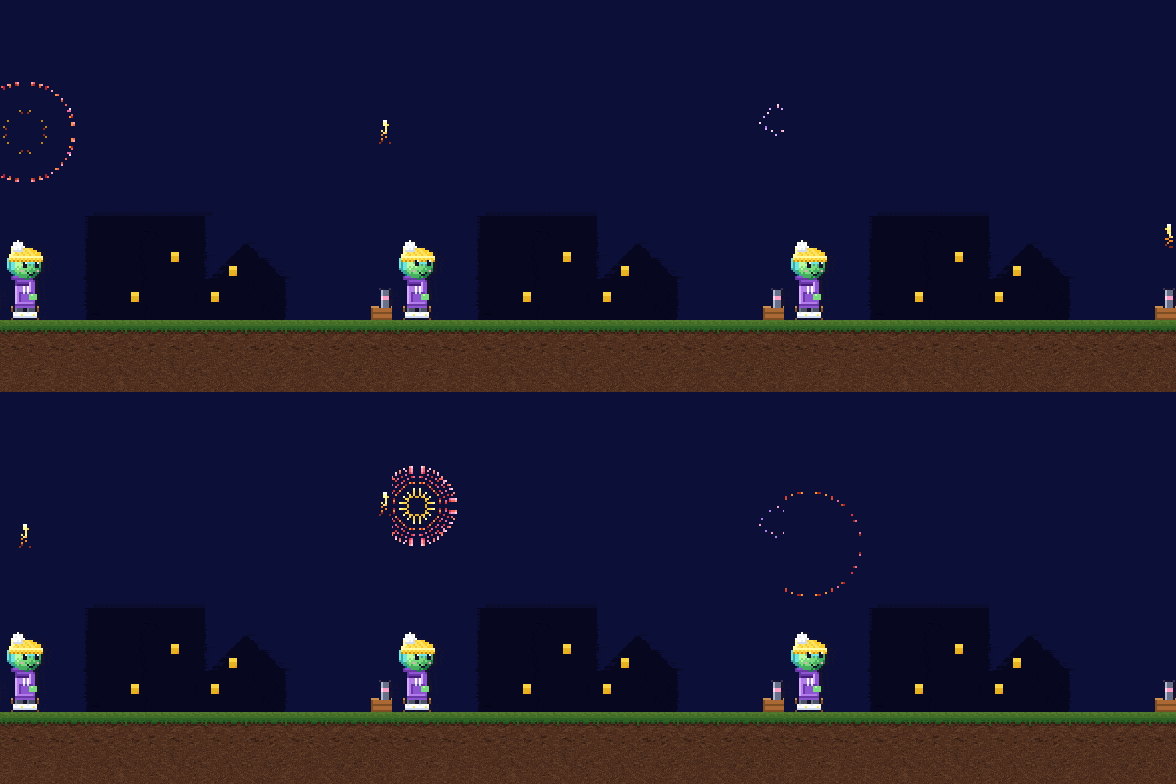
Three new Starters are about things that glow and drift, all drawn with Game-Maker monsters. Lightning Bugs has fireflies that blink on their own. Fireworks Night sends rockets up that burst into a ring, a peony and a willow over a sleeping town, and you can launch one yourself with Enter. Leaves in the Wind shows why one falling leaf looks stiff and another floats. These are the first games Kaylee, my basement computer, built on her own (more about her below). That makes 94 Starters and seven graduations, and all 101 fit on the Pocket Player.

Late-night fixes, and weather on the way
I kept playing after the stream, and kept finding things. Each one went to an agent, and most were fixed before I got to the next game.
- Picture templates. The Title Demo Starter used to show a busy menu picture next to a plain one. Now it gives you templates: the whole 320 x 200 screen with the exact boxes where the player writes the game’s name, the menu, the high scores and the save slots, measured from the player’s own code. They’re on the game’s disk, so you can open one in the picture editor and draw inside the lines.
- Less of the same song. I was hearing the same short tune over and over. An agent found that every Starter song had the same shape (eight bars, the same three instruments) and that some were copies. Forty-three Starters now have their own songs, and each group of Starters has its own band: a march, a chip tune, a calypso, a music box, swing, a little brass. The rest are on the list.
- Warnings you can see. Warning First said its bridge flickers before it falls. It didn’t; the plank was one striped picture. Now it really blinks (gently) and cracks before it goes, and the fog vent shakes before it puffs.
- Text you can read. Game-Maker prints every text page in purple, matched to the nearest purple in the game’s colors. In a few of my games that landed on red or gray. The player has a setting for that color, so those games now ship a player that picks a readable one, and nothing in their pictures changed.
- A countdown you can beat. In one graduation the countdown hit zero before you could reach the door. Now it starts at 9 and counts slower. The camel in the audience was too tall for his seat and lost his head off the top of the screen; he fits now.

Weather is next: a new group of Starters for rain, snow, lightning, heat waves and quicksand. Lightning flashes the whole sky with one shared clock (gently, never white or red). Heat waves make far hills shimmer, and a puddle on the road turns out to be a mirage. Quicksand ripples under you if you stand still. Those three are built and being put together; rain and snow are being made on Kaylee.
Two machines and a lot of helpers
All of this happened in about 43 hours, across 1,455 commits. I don’t type that fast. As in the last post, most of the work is done by AI agents, and I want to be plain about how.
On my Mac, Claude Opus 5.5 in Claude Code is the lead. It turns my requests into tasks and hands each one to a worker agent, usually Claude Sonnet 5.5, in its own copy of the code on its own branch. When a worker is done, the lead looks at the result and merges it if the checks pass. When a worker gets stuck, the task moves up to Opus instead of going around in circles. Every task’s outcome, and how many tokens it took, goes into a log so I can see what worked.
Kaylee is the second machine, a PC in my basement. She runs her own agents through Hermes, a small orchestrator: Claude models, and OpenAI’s Codex models too. The two machines talk through a mailbox, a folder of short messages that syncs between them, and the Mac hands Kaylee tasks over a locked-down SSH connection that can only drop off a task and read back its status. Kaylee takes the long jobs: full check runs over every game, scans of the old game archive, link and dependency checks, and now a few games and some art of her own. Her first piece of art was a sign for the Home Keys Starter.
Counting by commit credits since the last post, Sonnet worked on about 870 commits, Opus on about 530, and Kaylee’s agents on a couple dozen. I also asked for a dashboard of what all of this would have cost at API prices: about $1,482 for November 4 and 5, across both machines.
I don’t pay that, and the difference is worth a note. On the API, you pay for every token, with no cap: use more, pay more. The $1,482 is what the same tokens would have cost there at the public rates (the Codex part is an estimate). I use subscriptions instead: Claude Ultra for Claude Code, and a ChatGPT Pro plan for Codex on Kaylee. A subscription is a flat monthly fee, but it comes with limits instead of a bill: one over a short rolling window, and one for the whole week. Mine resets Friday at 7 PM Eastern.
So my problem is never a surprise bill. It’s running out of allowance before the reset. That changes how I work. Near the reset, I spend heavily, because any allowance left over is simply gone; I call it burning tokens efficiently. Early in the week, I’m more careful. And as this week ran low on the Claude side, Kaylee moved her new agents over to Codex models: GPT-6.1 Sol for most tasks, with GPT-6 Astra kept for the hard ones, because it uses up the allowance much faster.

Not everything went smoothly, and I like knowing where it broke:
- To save time and disk, some agents linked their copy of the built games to the ones in my own checkout. When they rebuilt, they rebuilt mine, from their newer code, and my dev server ended up serving stale games. Now each agent gets real copies (on the Mac’s file system, a copy costs no space until it changes).
- Twice, a merge was pushed while a test was failing, once for about five minutes. The push ran after the tests instead of only if they passed. Now the push is chained so it can’t happen unless the tests pass.
- One merge swept up another agent’s half-finished edits and broke the Pocket Player’s build. It was reverted, and the merge script now stops if it finds uncommitted changes.
- Too many heavy jobs at once slowed the whole Mac to a crawl. Now there are two shared slots for builds and full test runs, and everything else waits its turn.
On Thursday night I also went live on YouTube and worked on the project on stream. The agents paused their heavy jobs so the stream stayed smooth.
My part is the same as before: ask for things, play them, take photos of the boards when they look wrong, and say “that still doesn’t read right” more often than I’d like to admit.
Late that night Kaylee stalled. Her task board plans its work with Claude, and it ran out, so new tasks sat waiting. A Codex session on Kaylee moved her planning over to Codex, and the work started moving again. On my Mac, with my Claude allowance nearly spent for the week, Claude kept running the show while Codex did more of the heavy lifting, including two jobs on the Mac itself.
This follow-up covers the morning of Wednesday, November 4, 2026 through about 2 AM on Friday, November 6, 2026, in Eastern time. The code is on GitHub: where the last post left off and where this one ends.