Chasing a Phantom SSL Certificate Before the Interview
Earlier today, I met with a reporter who came to interview both the director of the Stone Branch Center for the Arts and me about the Restoring the Signal phone exhibit. Before the interview, I had spent days ensuring the website and supporting subdomains worked correctly, without certificate warnings or browser security alerts that might make visitors hesitant to explore the project further.
What should have been a fairly straightforward SSL issue turned into a surprisingly tangled mix of DNS, Apache, AutoSSL, WHM/cPanel, browser cache behavior, and stale configuration metadata.
After finally getting some sleep and revisiting everything with a clearer mind, the real problem became much easier to identify.
Preparing for Family Fun Day and the Interview
Most of last week was spent racing against the clock to prepare the exhibit for Family Fun Day while also getting things stable before the reporter’s visit.
By that point, I had already recorded the audio content and configured much of the phone system itself, but there were still countless small details left to solve:
- dialing behavior
- audio routing
- extension organization
- signage
- printed instructions
- and website cleanup
My primary goal became simple: make sure visitors could walk up, pick up a phone, dial something interesting, and have the experience work smoothly without technical distractions.
The SSL problem became especially frustrating because browser warnings immediately undermine trust and confidence. For a public-facing exhibit involving vintage communication technology, having modern browsers warn visitors not to trust the website was exactly the kind of distraction I wanted to avoid.
Preparing the Printed Materials

One of the last things I did before the interview was convert all of the exhibit flyers and documentation into a downloadable PDF for the website.
The file ended up being over 17 MB, so rather than emailing it directly, I uploaded it to the website and sent the reporter a link ahead of time. That would give her access to the digital files. I also printed out extra copies of the flyers, and she took a set when she arrived.
The printed material helped provide some of the broader context behind the exhibit, including:
- the history of the telephone and its 150-year anniversary
- how analog telephones function
- explanations of TTY technology
- how the exhibit came together
- and some of the planned future additions
One thing I quickly realized during the interview is that most readers are interested in the story and experience itself rather than the hidden technical infrastructure underneath the table.
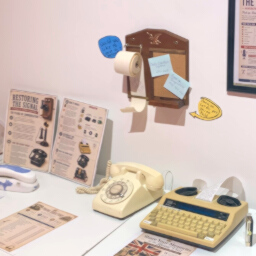
While there was a Raspberry Pi, networking hardware, adapters, and a tangled nest of wires hidden away in a shoebox beneath the exhibit, the photographer understandably focused almost entirely on the telephones themselves and the visual atmosphere they created. I also found that the director had framed and hung one of the flyers and taped a few items to the wall, such as additional flyers and small notes, to give the exhibit more personality. I joked that we need a closet with coats nearby that people can hide in and talk on the phone, as children often did for privacy, while their parents often picked up another line in the house to listen in.
The Interview and Demonstration
The interview itself went wonderfully. The director had made a few changes, adding an additional table, posting one of the flyers on the wall in a frame, putting two up on a desk stand, and adding fun post-it notes. She even set up the message center and wrote on the paper that my dog, Teddy, called. I hadn’t noticed, but she took the typed Rolodex card I showed her earlier and added it to the exhibit. I answered questions about how the exhibit works, how older telephone systems operated, and some of the creative directions the project could eventually take.

One idea I mentioned — though I haven’t implemented it publicly — was a “Dial Your Own Adventure” experience using a phone tree. I described the concept of navigating increasingly absurd menu prompts while a fictional sales company desperately attempts to sell extended phone warranties (a play on the extended car warranty spam people often receive). The idea immediately clicked because nearly everyone has experienced frustrating automated phone systems before.
At one point, I demonstrated something modern cell phones no longer allow: angrily slamming a rotary phone handset onto the hook and hearing the mechanical bells chime slightly afterward. That got a few laughs from those of us old enough to remember it.
The photographer spent quite a while taking pictures of the different phones and the exhibit itself. I posed for several shots holding a candlestick phone, with a rotary phone prominently in the foreground, while being told where to look.
Rediscovering Forgotten Technology
One of the most interesting parts of the interview was discussing how people reacted to the equipment differently depending on their age.
Many younger adults had never used a rotary phone. Some had only seen them in movies. Watching someone carefully rotate the dial and wait for it to return became almost a historical reenactment.
The TTY machines created another fascinating moment of recognition.
Many people who grew up during the 1980s remembered seeing “TTY” numbers at the end of television commercials, public service announcements, and infomercials. Yet despite recognizing the letters, most had never actually seen a TTY machine in person or understood how it functioned.
Part of the exhibit became an opportunity to finally explain the mystery behind those letters:
TTY = Teletypewriter
The machines allowed deaf and hard-of-hearing individuals to communicate over standard telephone lines by converting typed text into audio tones. It was like an early form of texting, but in real time. You could watch what the other person typed, letter by letter.
Hearing the tones while watching text appear on paper or a display suddenly connected many visitors to decades of half-remembered television experiences.
Discussing Microfiction
The reporter also became interested in the weekly 100-word stories I’ve been writing recently. I added almost everything I had to give people something to dial in and listen to, until more of the community started interacting and leaving their own messages to join in.
Microfiction is one of those formats that initially sounds restrictive until people realize how much creativity can fit into such a small space. The idea of telling a complete story in exactly one hundred words fascinated her, especially after hearing how weekly prompts shape the direction of each story.
In some ways, the microfiction hobby overlaps with the exhibit itself. Both involve working within limitations:
- older communication systems
- constrained formats
- mechanical boundaries
- and finding creative expression inside those constraints
Lunch at Melania’s
After the reporter left, the director and I caught up on a few things, and they invited me for lunch over at Melania’s Gourmet nearby. I had never been there, but recalled it had been featured in the national media the day before the King & Queens Royal Visit, but was closed the morning of the visit. Inside was a literal coffeehouse. It wasn’t exactly the artsy Beehive I had fond memories of in Oakland or Pittsburgh, but it definitely had a vibe. The Royal Blueberry Tarts grabbed my attention. I don’t believe I’ve ever had a tart before, and I was curious to come back another day to try one. I grabbed a muffin and a latte. What surprised me is that they signed it with some latte art. This is rare for any coffee shop these days, and it was nice to see a shop in Front Royal putting in some additional personality into their vocation.


Got The Whole World…
By the time I got home, I found that a package had arrived with my perpetual globe calendar. Looking for knick-knacks that were often seen near phones, I wanted to set up a calendar beside the clock with Roman numerals. I actually wanted a clock to wind up, but I didn’t want to put any burden on the director or myself to maintain the exhibit and keep winding it or setting the time if anyone forgot, so I went with a battery-powered clock, bold enough to make a statement and look like it fit in.
The calendar is fairly simple. Each day that passes, you flip the calendar to the other side, and the number increases or decreases. At the base, you can dial the month and the day of the week. I had gotten a simpler Pillsbury Calendar from Fleetwood Vintage on Main Street, but it was too comical for a historic phone station and better suited to a kitchen. Also, I believe rearranging the blocks every day to find the correct placement for the next day is unnecessary mental effort, and flipping the globe would be easy to figure out, so that anyone looking at the exhibit may be more inclined to flip to the next day. Also, it seemed like the numbers exposed on top of the blocks were distracting, as if something more was missing to cover them.


The director has expressed interest in a pen with a rotary dial cap, a wall-mounted rotary phone, and a payphone. I may keep my eye out for a deal, but for now, my focus is on cleaning up the website and finishing the graphical template.
The Original SSL Problem
The technical issue that nearly derailed my preparation involved the subdomain:
phone.lewismoten.com
Chrome reported that the SSL certificate belonged to:
phone.lewismoten.com.regaldragondanceparty.com
Safari behaved differently. Sometimes it worked. Sometimes it didn’t. DNS changes appeared to help temporarily before the problem returned again.
At first glance, it looked like:
- DNS propagation problems
- incorrect nameservers
- AutoSSL failures
- browser cache corruption
- or Apache virtual host confusion
As it turned out, multiple problems were overlapping simultaneously.
My Initial Assumption
My first theory was that the problem stemmed from continuing to use WordPress.com nameservers while pointing certain subdomains toward my WHM/cPanel server.
Because of that assumption, I temporarily migrated authoritative DNS control for lewismoten.com to my own WHM nameservers.
That involved:
- rebuilding DNS zones
- copying WordPress DNS records
- reconstructing SPF, DKIM, and DMARC records
- checking DNS propagation
- rebuilding Apache virtual hosts
- and repeatedly testing certificates
Although this ultimately was not the root cause of the SSL issue, it became valuable experience for eventually self-hosting my WordPress sites entirely.
The Real Root Cause
The actual issue turned out to be a combination of three separate problems:
- cPanel internally created the subdomain as:
phone.lewismoten.com.regaldragondanceparty.com
instead of treating it as a clean standalone hostname.
- AutoSSL exclusions from earlier troubleshooting prevented new certificates from being issued.
- Chrome aggressively cached earlier certificate mismatches and stale SSL state.
Together, these issues created confusing symptoms that made the problem appear to move around depending on the browser, cache state, and timing of DNS changes.
Discovering the Apache Virtual Host Problem
One of the most useful diagnostic commands became:
apachectl -S
This revealed that Apache had internally registered the host as:
phone.lewismoten.com.regaldragondanceparty.com
while only treating phone.lewismoten.com as an alias.
That explained why the incorrect certificate kept appearing.
Rebuilding Apache and User Data
Several cPanel maintenance commands proved extremely useful:
/scripts/updateuserdatacache/scripts/rebuildhttpdconf/scripts/restartsrv_httpd
These rebuilt Apache virtual host configurations and refreshed cPanel’s internal metadata.
Discovering AutoSSL Exclusions
Even after Apache was corrected, AutoSSL logs still reported:
COMPLETELY_EXCLUDED: All domains are excluded from AutoSSL.
That turned out to be the final major blocker preventing certificate issuance.
The fix became:
whmapi1 remove_autossl_user_excluded_domains \username=regaldra \domain=phone.lewismoten.com \domain-1=www.phone.lewismoten.com
After that, AutoSSL successfully issued the correct certificate.
Verifying the Certificate
Once AutoSSL completed successfully, I verified the certificate directly from the terminal:
openssl s_client -connect phone.lewismoten.com:443 \-servername phone.lewismoten.com \</dev/null 2>/dev/null \| openssl x509 -noout -text
The important part was the Subject Alternative Name section:
DNS:phone.lewismoten.comDNS:www.phone.lewismoten.com
Even though the certificate’s Common Name listed:
CN=www.phone.lewismoten.com
modern browsers validate against SAN entries, so both hostnames were properly covered.
Browser Cache Confusion
One particularly deceptive aspect of the process involved Chrome caching old SSL and HSTS information aggressively.
Even after the server-side problem had been corrected:
- Chrome still complained
- Safari appeared correct
- DNS looked healthy
- Apache looked healthy
Completely closing the browser and clearing Chrome’s internal network caches finally resolved the lingering warnings.
Several times during troubleshooting, I mistakenly believed new changes had failed when I was actually viewing stale browser state.
Followup
With the certificates now fixed, I sent a follow-up to the reporter saying the website was working. Since she had expressed a bit of interest in the 100-word stories, I gave her more context about them and my writing process, and invited her to try them out.
Email to Reporter
Hello Laura,
Thanks again for visiting the Restoring the Signal exhibit at Stone Branch Center for the Arts. I also wanted to let you know that the website certificate issue has now been resolved. ( https://phone.lewismoten.com/Restoring%20The%20Signal%20Info.pdf ) If you have any additional questions about the exhibit, the phones, TTY technology, or the project itself, please feel free to reach out anytime. I’ve been discussing ideas with Terre to create a small flip-through binder that describes the technology and use of the different things I’ve found and set up, in a similar fashion to the flyers you picked up today.
You seemed especially interested in the 100-word stories, so I wanted to provide a little more context behind them.
The stories are part of a long-running podcast community centered around microfiction — stories written in exactly 100 words. The podcast, One a Day Until the Day I Die, hosted by Laurence Simon, features short daily episodes with a single 100-word microfiction story. Each week, he posts a topic prompt and contributors submit their own recorded stories based on that theme. The stories are usually released every Sunday as podcast episodes. He has a list of topics available throughout the end of this year.
For me, the project serves as a creative mini-exercise that helps balance out the more technical and serious material I often post on my blog.
Although I use software tools during production, the stories themselves are written entirely by me. I handle voice cleanup and audio editing in Audacity, remove background noise, and add music and atmosphere afterward. Years ago, I experimented with Microsoft Songsmith to generate background music. More recently, I’ve been experimenting with AI-generated instrumental music using Google Flow Music, where I feed the story itself into the prompt and then rearrange sections of the generated music to better match the mood and pacing.
I also create AI-generated cyberpunk-themed artwork featuring myself within the story’s setting, along with a custom logo treatment to visually separate those posts from my regular blog entries. Afterward, I usually write a “Behind the Story” section discussing inspiration, memories, writing decisions, and the process behind the piece.
This past Sunday’s topic was “Complete Idiot.” After trying several title ideas, I ultimately settled on The Incomplete Idiot.
There was actually about a 12-year gap before I resumed writing regularly again earlier this year. Since then, I’ve been recovering and reposting older stories dating back to around 2009. Originally, many of those stories were posted under my Second Life avatar name, “Dedric Mauriac,” because much of the podcasting community gathered through Podcamp SL and related virtual-world communities.
Around that same time, I hosted two podcasts. Blue Hair focused on life and culture inside Second Life, including interviews and discussions about virtual communities, visitor statistics, digital sales, content theft, and online creativity. The other podcast, Dreamy Audio, was much stranger and more experimental. I would wake up from dreams during the night, immediately record myself describing them on a voice recorder while still half-asleep, and then go back to bed. The result was a collection of surreal dream recollections captured before waking logic erased them. I’m in the process of restoring the dreamy audio episodes using AI to transcribe them for dream analysis and find common patterns with past episodes.
Later, after receiving a pacemaker implant, I briefly returned in 2014 under the name “Mystery Robot Joe.”
I also frequently discuss the stories during the monthly Writers Salon gatherings at Stone Branch and have read several during open mic events in the gallery.
I’ve never completed the NaNoWriMo challenge, but the 100-word stories are much more achievable and fun as a community project. If you are interested in writing creatively without pressure to commit, for a small audience, I recommend checking out the podcast and considering writing a 100-word story of your own and possibly submitting it.
Here are a few links related to this past Sunday’s story:
Weekly Challenge #1046
Topic: Complete Idiot
My Story Title: The Incomplete Idiot
My Story Post:
https://lewismoten.com/2026/05/10/100-word-stories-the-incomplete-idiot/
Google Flow Music Instrumental:
https://www.flowmusic.app/song/9a476b64-add0-436d-b5dc-d9ef4388dcd0
Weekly Challenge Episode with all participants:
https://oneadayuntilthedayidie.com/?p=41386
Podcast Homepage:
https://oneadayuntilthedayidie.com/
Weekly Challenge Information: https://oneadayuntilthedayidie.com/?page_id=12
Podcast Email: isfullofcrap@gmail.com (original podcast was http://podcasting.isfullofcrap.com )
Topic Schedule: https://oneadayuntilthedayidie.com/?cat=107
All 29 of My 100-Word Stories:
https://lewismoten.com/category/hobbies/writing/100-word-stories/
Thanks again for taking the time to visit the exhibit and talk with us.
Lewis Moten
Looking Back
In hindsight, moving the nameservers themselves was largely unnecessary for solving the SSL issue. However, the experience ended up becoming a valuable rehearsal for eventually taking complete ownership of my WordPress hosting environment.
More importantly, the certificate errors were finally resolved before visitors and reporters began exploring the project online.
For a project centered around restoring and preserving older communication technologies, it would have been somewhat ironic if the first thing visitors encountered was a modern browser warning telling them not to trust the website.