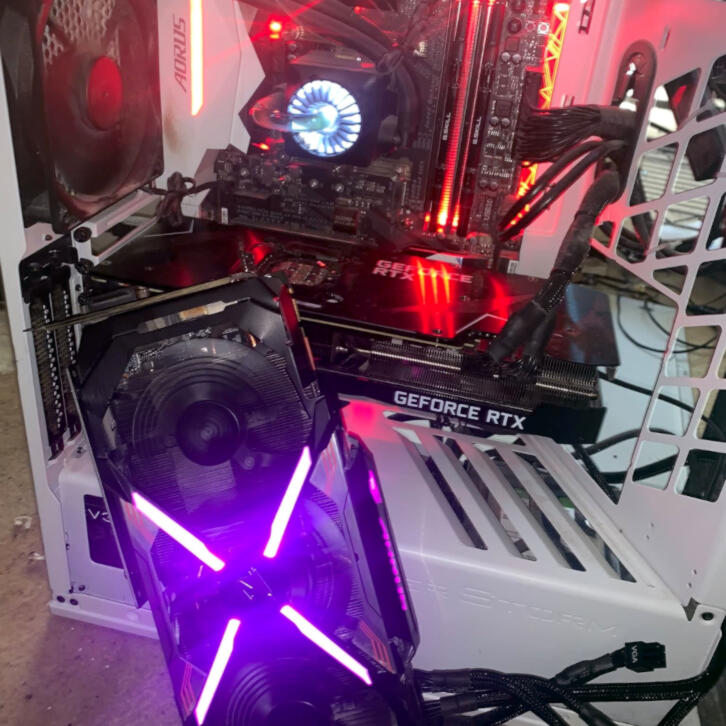
TLDR: I added an old 1080 Ti video card to my server, ran some tests, and set it up to take on 20% more work, shaving 9 days off a 47-day process.
What a day.
This morning, I woke up a bit early. I checked in with Hermes to see how the distributed agent batch job website was going. Things were progressing, and they told me to relax, not worry about today, and focus on my medical appointment. They also reaffirmed that they were only making conservative changes and not modifying the existing batch processing jobs.
I also ran an idea by ChatGPT about my current setup, since it had an old conversation about my old gaming rig, which I repurposed into an AI server. I gave it a theoretical challenge: what could I do to improve the setup with $1,000? The recommendation was to upgrade the server by buying a used NVIDIA GeForce RTX 3090 with 24GB of VRAM and using the leftover funds to double the DDR4 system RAM. Afterward, it said to sell the 3080 TI when done to reduce the upgrade cost.
I was curious if both cards could be used together to support models up to 36 GB on the GPU. Ollama can split one model across multiple GPUs, but without NVLink for the older cards, it doesn’t behave like a single 36 GB card. Ollama has improved scheduling for multiple, mismatched GPUs. The model would need to be smaller than 36 GB, as you still need room for the runtime allocation and the KV cache that holds the conversation/context.
The motherboard itself, a Z270X-Gaming 7, is suited for the physical PCIe side. However, there was a question about the power supply and what it could support. I looked at what I had. It was modular. A VGA Supernova 350 G2 with 850W of power, and the rating was gold in terms of efficiency. I also found an old PCIe ribbon cable that would let me mount the card vertically.
From here, Chat determined that the power supply would also need an upgrade to support a long-running server with GPU power spikes.
| Load | Approx. draw |
|---|---|
| RTX 3090 | 350 W |
| RTX 3080 Ti | 350 W |
| i7-7700K, board, SSD, fans | 120–180 W |
| Potential total | 820–880 W |
Another option was to set up the two cards, but limit their power to 275W for the 3090 and 250W for the 3080 Ti. I wouldn’t need to purchase a better power supply, and I’d still get the benefit of the additional VRAM. I could also purchase a separate PSU, or pull one from an old PC if it supported the 8-pin connectors. Another option was to pull out my power bench supply and jerry-rig something together as a last resort.
Woul the extra card run faster? No. The 3090 is only slightly faster than the 3080 Ti, so the qwen3:8b model would run at the same speed. The 24 GB would let qwen3-coder:30b fit on the GPU instead of spilling into system RAM, which was a bottleneck that drastically slowed it down – so yes, larger models would run faster now that they could fit in the GPU VRAM, but existing models that already fit would not run faster. Sharding larger models across two GPU’s does make them run a little slower than if they entirely fit onto one GPU since the cards need to pass work between each other.
I was then presented with an ideal layout:
| Card | Best role |
|---|---|
| RTX 3090, 24 GB | Main 30B coder/reasoning agent |
| RTX 3080 Ti, 12 GB | Reviewer, vision, quick assistant, embeddings, or a second 8B–14B agent |
| Both together | Occasional larger 26–34 GB model when quality matters more than speed |
Since I was tripling GPU memory, I thought parallelism could help speed things up, as I could run three copies of qwen3:8b in memory. The problem is that tripling GPU memory doesn’t triple compute. I still only have two GPUs, so the total capacity ends up closer to twice as much work in the allotted time, not triple.
I then had this setup proposed:
| GPU | Work |
|---|---|
| 3090, 24 GB | Two concurrent Qwen3 sessions, or one 30B model |
| 3080 Ti, 12 GB | One Qwen3 session / reviewer / vision task |
The issue is that two sessions share the 3090’s compute, so each would be slower than a session on the 3080. They may still finish more total work per minute, especially for independent, long-running tasks. However, ChatGPT recommends keeping one Qwen3 model loaded per GPU and reserving the 3090 for a heavier role when I need the 30B coder model, and the 3080 Ti for the fast agent/reviewer.
One additional note: I didn’t need additional “copies” of Qwen3. Ollama can serve multiple requests from one loaded model, with concurrent conversations consuming additional KV cache memory. Separate copies/instances are mainly useful for strict GPU assignment or different context/settings. My OpenClaw fleet could become meaningfully more parallel. The extra card simply supplies another full worker, and the extra VRAM keeps those workers from constantly unloading, reloading, or falling back to RAM.
I was more focused on Laguna xs at 20 GB, or on qwen3.8:27b at 18 GB with a 246k context window for more flexibility and features like a mixture of experts. I’d be getting access to a much better class of local agent models that could make long context and vision features useful.
| Model | What dual GPUs change |
|---|---|
qwen3:8b | More simultaneous agents, but not a major quality leap |
qwen3-coder:30b | Fully GPU-resident on the 3090; much faster than RAM spill |
qwen3.8:27b (~18 GB quant) | Fits on a 3090, but dual GPUs leave room for context, vision, and a second agent |
| Laguna XS 2.1 Q4 (20 GB) | Fits on a 3090 tightly; dual GPUs make its long-context use much more realistic |
| Laguna XS 2.1 Q8 (36 GB) | Still too tight for 36 GB total VRAM once runtime and context memory are included |
| Laguna S 2.1 Q4 (75 GB) | Still well beyond this machine |
Laguna is currently the target, with 3B active MoE (a selection of expert weights is picked for each token), specifically for long-horizon agentic coding with tool use and a 256k context. It changes the question from “does it start?” to “does it keep working?” Qwen3.8:27b is dense (every weight is hit for every token). Qwen leaves little headroom once a real agent conversation builds up. Qwen brings in image and video understanding.
Chat recommended keeping Qwen3.8 27b as the general capable local worker for code, reasoning, image input, and broad assistant work while testing Laguna XS 2.1 as the specialist long-running coding agent, and to keep qwen3:8b or another small model on the 3080 TI for quick reviews, summaries, classifications, or independent second opinions, and then use both GPU’s to shard Qwen or Laguna when I need a large context or a higher quantization.
I liked the different strategies it recommended as our conversation went on, asking questions about performance and memory improvements, and various configurations. I decided to go into the basement and assess everything I had with a GPU. Old laptops, a hypervisor bartop arcade, a few used PC’s I purchased from the library a few years ago, etc.
While looking around, I found an old 1080 Ti video card (GV-N108TAORUS X-11GD rev. 1.0). This felt like a jackpot. 11 GB of VRAM. No money down. I had already invested. I had forgotten this was the original card I bought for Kaylee.
I went back to ChatGPT and started going back and forth. At first, it thought I wanted to add it as a third card and recommended using it as a separate, lightweight Ollama node (“Wren” node) that could run on a cheap, used tower. I course-corrected and said I wanted to use the 1080 Ti instead of a 3090.
It would nearly double my GPU memory to 23 GB, enough to test whether a multi-GPU setup works well with my OpenClaw jobs and eliminate the current RAM spill for larger models. The card uses 100 watts less than a 3090, so the 750 W max would fit within my PSU’s 850 W limit.
| Component | Stock maximum |
|---|---|
| RTX 3080 Ti | ~350 W |
| GTX 1080 Ti | ~250 W |
| Rest of Kaylee | ~100–150 W |
| Worst-case total | ~700–750 W |
ChatGPT was still recommending power limiting for a long-running server. 300 W on the 3080 Ti and 200- 225 W on the 1080 Ti. Unfortunately, the 20 GB Laguna XS and 18 GB Qwen3.8 wouldn’t be great for a long-context, fully GPU-resident experience with just 23 GB available. The models are smaller, but the model weights and runtime overhead are tight. It would tell me whether the eventual 36 GB 3090 + 3080 Ti setup would be worth pursuing.
My PSU is modular; I only plugged in the power cables I needed. I did a bit of digging and found two 8-pin cables in the motherboard box, along with a PCIe riser/ribbon cable. My tower had two vertical slots to screw in the 1080 Ti video card, but the 3080 Ti card was too wide. I was at a bit of a loss. Eventually, I just laid it against the case for now. It just needed power and a data connection. I could figure out the rest later.

I booted the machine and found the new card wasn’t detected. I figured this would happen, as I had a 50/50 chance of guessing which slot wasn’t shared with the M.2e drive. I moved the extender to the next PCIe slot and booted again. nvidia-smi couldn’t detect it, but the computer did detect both the 3080 Ti and 1080 Ti.
01:00.0 VGA compatible controller: NVIDIA Corporation GA102 [GeForce RTX 3080 Ti] (rev a1)02:00.0 VGA compatible controller: NVIDIA Corporation GP102 [GeForce GTX 1080 Ti] (rev a1)
From here, I learned that the older card uses a proprietary driver, so I needed to change nvidia-driver-595-open to nvidia-driver-595. I went through a few steps to change the driver, but I still had problems detecting the 1080 Ti. I then downgraded the driver from 595 to 580.
At this time, I was running late for a medical appointment. I left the machine while it was downgrading, but I decided not to let it reboot itself when it finished, in case it needed my intervention to come online.
Many Commands to install proprietary drivers and downgrade on Ubuntu
ai@kaylee:~$ nvidia-smi -L
GPU 0: NVIDIA GeForce RTX 3080 Ti (UUID: GPU-9dce61c7-ad2f-125f-3592-ae6f0c323754)
ai@kaylee:~$ nvidia-smi
Wed Sep  9 16:15:49 2026
+-----------------------------------------------------------------------------------------+
| NVIDIA-SMI 595.84                 Driver Version: 595.84         CUDA Version: 13.2     |
+-----------------------------------------+------------------------+----------------------+
| GPU  Name                 Persistence-M | Bus-Id          Disp.A | Volatile Uncorr. ECC |
| Fan  Temp   Perf          Pwr:Usage/Cap |           Memory-Usage | GPU-Util  Compute M. |
|                                         |                        |               MIG M. |
|=========================================+========================+======================|
|   0  NVIDIA GeForce RTX 3080 Ti     Off |   00000000:01:00.0  On |                  N/A |
|  0%   52C    P8             12W /  350W |       9MiB /  12288MiB |      0%      Default |
|                                         |                        |                  N/A |
+-----------------------------------------+------------------------+----------------------+

+-----------------------------------------------------------------------------------------+
| Processes:                                                                              |
|  GPU   GI   CI              PID   Type   Process name                        GPU Memory |
|        ID   ID                                                               Usage      |
|=========================================================================================|
|  No running processes found                                                             |
+-----------------------------------------------------------------------------------------+
ai@kaylee:~$ sudo apt install nvidia-driver-595
...
ai@kaylee:~$ sudo reboot
...
ai@kaylee:~$ sudo dmesg | grep -iE 'nvrm|nvidia'
[    3.318557] nvidia: loading out-of-tree module taints kernel.
[    3.318565] nvidia: module license 'NVIDIA' taints kernel.
[    3.318569] nvidia: module verification failed: signature and/or required key missing - tainting kernel
[    3.318573] nvidia: module license taints kernel.
[    3.455265] nvidia-nvlink: Nvlink Core is being initialized, major device number 236
[    3.455270] NVRM: The NVIDIA NVIDIA GeForce GTX 1080 Ti GPU installed in this system is
               NVRM:  supported through the NVIDIA 580.xx Legacy drivers. Please
               NVRM:  visit http://www.nvidia.com/object/unix.html for more
               NVRM:  information.  The 595.91.07 NVIDIA driver will ignore
               NVRM:  this GPU.  Continuing probe...
[    3.462690] nvidia 0000:01:00.0: vgaarb: VGA decodes changed: olddecodes=io+mem,decodes=none:owns=io+mem
[    3.506714] NVRM: ignoring the legacy GPU 0000:02:00.0
[    3.511041] nvidia 0000:02:00.0: disabling already-disabled device
...
ai@kaylee:~$ sudo apt-get --no-install-recommends install nvidia-driver-580
...
ai@kaylee:~$ sudo reboot
...

ai@kaylee:~$ sudo rm -rf /lib/modules/$(uname -r)/kernel/nvidia-595-open
ai@kaylee:~$ sudo dkms install --force -m nvidia -v 580.178.04 -k $(uname -r)
ai@kaylee:~$ sudo depmod -a
ai@kaylee:~$ sudo update-initramfs -u -k $(uname -r)
...
ai@kaylee:~$ sudo reboot
...
ai@kaylee:~$ nvidia-smi -L
GPU 0: NVIDIA GeForce RTX 3080 Ti (UUID: GPU-9dce61c7-ad2f-125f-3592-ae6f0c323754)
GPU 1: NVIDIA GeForce GTX 1080 Ti (UUID: GPU-495d90cf-9a03-1fbf-f707-b4c987e018aa)
ai@kaylee:~$
I got home late. The downgrade was done. I rebooted and checked – finally, both cards were recognized with nvidia-smi.
Now, it was time for benchmarks.
Well, my Hermes Agent on the server wasn’t responding via the gateway. I could talk to it via Telegram as a backup, but I didn’t fully grasp the problem until I got home. Hermes dashboard was still listening on 9119, but I couldn’t connect to it remotely via the network name, IP address, or Tailscale. I used my own local Hermes on the MacBook and had a conversation. We found that the ~/.hermes/.env file had export settings that you would run in a shell, instead of the actual variable format needed. I hadn’t caught onto the problem until the machine went through its first reboot, and was oblivious to what was going on. The other solution was to bump the port to 9120 so it wouldn’t compete with what had already been setup. From there, I could talk to hermes again on Kaylee.
Hermes suggested a controlled benchmark of throughput and concurrency, rather than VRAM capacity alone. qwen3:8b is still loaded entirely on the 3080 Ti. The topology is PHP for GPU-to-GPU without NVLink (no tensor), so transfer overhead will be noticeable. Since the 1080 Ti is unused, it is suitable to test as an independent batch worker. They had a few proposals to measure:
qwen3:8bpinned to GPU 0 vs GPU 1 — prompt/evaluation tokens per second and VRAM.- Two simultaneous independent jobs, one per GPU — aggregate throughput and interference.
- Large-model split across both GPUs only if its single-card load fails — compare it against CPU/GPU-offload alternatives.
- Context sizes that matter for your archive work (8k, then a higher practical level), including whether they trigger eviction.
I didn’t even choose an option. I just said to stop the batch processes on the cron jobs for now, as anything we find will likely speed up the jobs overall.
What’s amazing is that the agent not only makes recommendations but can also do almost everything for benchmarking. I’m not spending hours researching commands, seeing how others do it, diagnosing problems, finding someone else’s workaround, evaluating the raw data, and building scripts to consolidate it into a report. Agents just take off running and come back with what you need at breakneck speed while I head to the fridge to get a drink of water, check the kettle, take the dogs out for a walk, check the kettle…
So we finally got some results:
| Workload | RTX 3080 Ti | GTX 1080 Ti | Both GPUs |
|---|---|---|---|
| Qwen 8B, 8k context — generation | 110.7 tok/s | 42.2 tok/s | independent concurrent jobs: 151.7 tok/s aggregate |
| Qwen 8B, 8k context — prompt ingest | 4,412.7 tok/s | 726.5 tok/s | 5,140.6 tok/s aggregate |
| Qwen 8B, 40k context — generation | 68.1 tok/s | not tested alone | 39.8 tok/s |
| Qwen 8B, 40k context — prompt ingest | 2,629.7 tok/s | not tested alone | 683.1 tok/s |
Optimal configuration
- Run the primary Qwen worker on the RTX 3080 Ti only, including 40k-context jobs. It fits: peak measured VRAM was 10.9 GB of 12 GB.
- Run a separate, lower-priority Ollama worker pinned to the GTX 1080 Ti for independent short-context work. It gives a meaningful ~42 tok/s without slowing the main worker.
- Do not split Qwen 8B across both cards for 40k work. The two-card run was about 3.8× slower at prompt ingestion and 1.7× slower at generation than the 3080 Ti alone.
- Keep batch contexts at 8k whenever chunking is viable. Use 40k only for records that genuinely need it, routed to the 3080 Ti.
The GTX 1080 Ti benchmark was verified on its own card; the current Ollama release uses its CUDA v12 backend for that Pascal GPU.
Ugh… the speed is so slow that it actually slows the models when sharded across GPUs. This doesn’t bode well for larger coding models. The 3090 may be the answer after all. I think the main thing is that I could reduce a 3-day job to 2 days using the Qwen3:8b model, which is currently set up to process a large batch for the next two months, with more data in the queue once it’s done.
I had Hermes try out the larger models anyway. The initial results looked promising for Laguna XS Q4 at nearly 97 tokens per second, but they dropped sharply when the context jumped to 40k.
| Model | Context | Prompt ingest | Generation | Initial load |
|---|---|---|---|---|
| Laguna XS Q4 | 8k | 1,851 tok/s | 97.5 tok/s | 26.2 s |
| 40k | 874.7 tok/s | 62.1 tok/s | 13.9 s | |
| Qwen3-Coder 30B | 8k | 1,742 tok/s | 66.3 tok/s | 49.6 s |
| 40k | 449.7 tok/s | 42.3 tok/s | 15.1 s |
Hardware routing
- Qwen 8B: RTX 3080 Ti only; use GTX 1080 Ti as a separate background worker.
- Laguna or Qwen3-Coder: exclusive two-GPU workload. Both models offloaded every layer to GPU, consuming nearly all combined VRAM.
- Laguna is materially faster on this hardware: about 47% faster generation at 8k and 47% faster at 40k than Qwen3-Coder.
- Qwen3-Coder is viable, but reserve it for coding tasks where its code specialization produces a quality advantage worth the slower response.
Hermes requires a model with at least 64k context, so I still don’t see a viable way to run it locally. I sent Hermes on a mission to test with 64k context. I was also blind to the “before” picture, when I only had the 3080 Ti and the models spilled over into system RAM. Hermes went ahead and planned the GPU-only and CPU-offload tests, along with a 64k input test framework. I knew it would be bad. I just wanted to see how bad it would be. Was it at least usable? I try to shoot for 100 tokens per second, which is why Laguna XS was so attractive at 97 tokens. It was as slow as molasis the last time I tried it, but I wasn’t measuring it.
I don’t trust the initial load for the larger context windows. I believe the models were already loaded from the 8k context windows, which greatly reduced the initial load for the 40k context.
Why does context drastically affect the speed? How can I increase the context to 100k, or up to 262k for models that support it, without significantly affecting speed? Do I have any control over sharding that could improve it, such as ensuring most of the model lives on the 3080 Ti, or that the most active parts do?
In the meantime, I noticed Hermes started thinking again, seemed to hit a timeout in the terminal, and began planning incremental result saving and background processing. It was determined to get those benchmark results. I’m thinking: so much research, testing, and verification has been done that it would have taken me around a week to do all of this on my own.
The results took much longer to come back this time. It’s as bad as I expected, but at least I have a comparison between dual GPUs and RAM spillover.
Laguna XS Q4 — 3080 Ti only vs. both GPUs
| Context | 3080 Ti only | Both GPUs split |
|---|---|---|
| 8k | 314.2 prompt tok/s · 50.3 gen tok/s | 1,850.8 prompt tok/s · 97.5 gen tok/s |
| 40k | 478.7 prompt tok/s · 45.3 gen tok/s | 874.7 prompt tok/s · 62.1 gen tok/s |
| 64k | 448.4 prompt tok/s · 41.1 gen tok/s | 629.8 prompt tok/s · 48.5 gen tok/s |
At 64k, the two-card configuration is only ~18% faster for generation than the 3080 Ti alone. The 3080-only run left the 1080 Ti free.
Qwen3-Coder 30B — 3080 Ti only vs. both GPUs
| Context | 3080 Ti only | Both GPUs split |
|---|---|---|
| 8k | 386.5 prompt tok/s · 15.3 gen tok/s | 1,742.1 prompt tok/s · 66.3 gen tok/s |
| 40k | 545.7 prompt tok/s · 24.5 gen tok/s | 449.7 prompt tok/s · 42.3 gen tok/s |
| 64k | 475.4 prompt tok/s · 20.7 gen tok/s | 283.8 prompt tok/s · 30.1 gen tok/s |
For Qwen3-Coder, two cards improve generation but actually make long-prompt ingestion slower than the 3080-only hybrid layout.
64k compatibility
qwen3:8bcannot be a 64k Hermes model. Its model metadata caps it at 40,960 tokens; Ollama enforced that cap when asked for 64k.- Laguna accepted a real 57,043-token prompt at a 65,536-token context. Its native context is 262k, but its RoPE scaling reports an original 8k context—long-context quality needs task-level validation.
- Qwen3-Coder 30B accepted a real 57,009-token prompt at 65,536 context; its native context is 262k.
What “3080-only” actually did
These were not CPU-only runs. Ollama kept all model layers GPU-offloaded, but reduced the GPU-resident model buffer and memory-mapped the remaining weights from host RAM as context grew.
For example, Laguna’s 3080-only 64k run used:
- 7.48 GB GPU model buffer
- 2.56 GB GPU KV cache
- 19.17 GB CPU-mapped model buffer
Qwen3-Coder’s 3080-only 64k run used:
- 4.15 GB GPU model buffer
- 6.14 GB GPU KV cache
- 14.32 GB CPU-mapped model buffer
Practical conclusion for a 64k Hermes model
- Laguna on the 3080 Ti alone is the best balance if keeping the 1080 Ti available matters: 41.1 gen tok/s at 64k.
- Laguna split across both GPUs is the fastest 64k option measured: 48.5 gen tok/s, but it monopolizes both cards.
- Qwen3-Coder 30B is viable at 64k but is slower: 20.7 tok/s on the 3080 alone or 30.1 tok/s split.
- Keep
qwen3:8bfor batch work, not Hermes at 64k.
So here I am wondering if there is a configuration issue with Ollama. Is there anything I can do to optimize Laguna or qwen3-coder, especially as the context grows? Is Ollama prioritizing the 3080 over the 1080 and making sure the parts of the model used more often are on the 3080?
Hermes started looking into measuring a manually weighted two-GPU llama.cpp tensor split via Ollama. llama.cpp is the actual engine under the hood that lets you configure everything yourself. Ollama is just a user-friendly interface to it. As Hermes moved along, I saw it test different quantization parameters, configure the cache for capacity, review allocation logs, and analyze quantization cache optimization. As Marty McFly would say, “Doc, this is heavy”
Finally, Hermes came back with an analysis:
Ollama is not optimizing for the 3080 Ti’s higher compute speed. It is primarily fitting the model and KV cache into available VRAM.
At 64k with the default F16 KV cache:
- Laguna: 20 layers on the 3080 Ti, 21 on the 1080 Ti; GPU model buffers were 8.79 GB vs. 8.43 GB, and KV cache was 1.28 GB on each.
- Qwen3-Coder: 21 layers on the 3080 Ti, 28 on the 1080 Ti; model buffers were 7.59 GB vs. 6.30 GB, while KV cache was 2.69 GB on the 3080 Ti and 3.46 GB on the 1080 Ti.
So the slower 1080 Ti is carrying at least as much of the inference path. Ollama’s temporary runner command contains no explicit split configuration; it is using automatic placement.
Also, transformer layers are not “used more often” in the usual sense: every generated token passes through every layer. The useful optimization is to put a larger portion of the model and/or KV cache on the faster card—but at 64k the 3080 is already nearly full.
I tested the available knobs.
Manual 60/40 split toward the 3080
The installed llama-server supports:
LLAMA_ARG_SPLIT_MODE=layerLLAMA_ARG_TENSOR_SPLIT=3,2LLAMA_ARG_MAIN_GPU=0
I tried that 3:2 split at 64k for both models. It failed with CUDA out-of-memory on the 3080 Ti:
- Laguna failed allocating another ~896 MiB CUDA buffer.
- Qwen3-Coder failed allocating another ~3.75 GiB CUDA buffer.
So at 64k, the 3080 cannot take a materially larger default-F16 share without sacrificing cache or model residency.
Quantized KV cache: actual measured alternative
I tested q8_0 for both K and V caches. This halves cache precision/storage versus F16, frees VRAM, and lets auto-placement favor the 3080 slightly more.
| Model at 64k, two GPUs | Default F16 KV | Q8 KV | Effect |
|---|---|---|---|
| Laguna prompt ingest | 629.8 tok/s | 760.0 tok/s | +20.7% |
| Laguna generation | 48.5 tok/s | 45.3 tok/s | −6.7% |
| Qwen3-Coder prompt ingest | 283.8 tok/s | 364.1 tok/s | +28.3% |
| Qwen3-Coder generation | 30.1 tok/s | 23.1 tok/s | −23.3% |
With Q8 KV, placement changed:
- Laguna: 21 layers on the 3080, 20 on the 1080; model buffers 9.31 GB / 9.06 GB.
- Qwen3-Coder: 24 layers on the 3080, 25 on the 1080; model buffers 8.64 GB / 8.14 GB.
That confirms the cache is the main constraint as the context grows.
Recommendation
For a 64k Hermes session:
- Laguna: use the default F16 KV layout for the best interactive generation speed and full cache precision: 48.5 tok/s.
- If long initial-context ingestion dominates and modest KV quantization proves acceptable in real agent work, use Q8 KV: Laguna ingests 64k-context prompts ~21% faster.
- Qwen3-Coder: keep default F16 KV for Hermes-style generation. Its Q8 configuration improves ingestion but loses 23% generation speed.
The next worthwhile test is mixed KV precision—for example, quantize K only while retaining F16 V—because it may free enough VRAM to favor the 3080 without the full generation penalty of quantizing both caches. I have not persisted any of these runner settings; both GPUs are idle and the paused batch crons remain paused.
It came back with some interesting results. When you reduce cache precision/storage, prompt ingestion speeds up significantly, but token generation slows down significantly. The main problem is that the models are at capacity when using both cards, so there’s no room to favor one card over the other. If I upgrade to a 3090 with 24 GB, it’s going to increase the overall VRAM to allow these two larger models to be distributed in optimal configurations, but there isn’t going to be much difference between the 3080 Ti and 3090 where it would make much of a difference. I’m already using the smallest model of Laguna at 20 GB. The same goes for Qwen-Coder at 19 GB.
Hermes started running tests for mixed KV precision, but after 420 seconds, it returned that the tests exceeded the terminal’s foreground limit and were still running in the background. Based on findings so far, there was a suggestion that the mixed layout may be much slower than the earlier tests on the GPU pair.
I think we’ve pushed these cards as far as they could go and found the boundaries. It’s time to optimize the existing batch processing jobs to stick with the qwen3:8b models on both GPUs and assign a third of the work to the older GPU so they can run in parallel.
As one last-ditch effort, I asked Hermes if there were any other models they would recommend from https://ollama.com/search, or do we pretty much already have what is the most optimal at the moment?
We do not yet have proof that Laguna is globally optimal; it is only the fastest tested 64k model on this machine. Three models are worth testing before committing:
| Priority | Model | Why it is a candidate | Hardware fit |
|---|---|---|---|
| 1 | qwen3.6:27b | Newer Qwen agentic-coding model; 256k context, vision, tools, thinking preservation; only 18 GB on disk. Most direct successor to Qwen3-Coder. | Strong candidate for both GPUs at 64k; possibly less constrained than the 19 GB Coder model. |
| 2 | nemotron-3.5-lightning:30b | 30B MoE with only 3B active parameters, purpose-built for always-on agents and explicitly lists Hermes support; 1M context. | 25 GB means both GPUs required, but the low active parameter count could make generation competitive. |
| 3 | nemotron3:33b | 128k context plus image, video, audio, OCR, and transcription understanding. Best fit for your Facebook/media/document workflow. | 28 GB; both GPUs required and likely slower than Laguna for ordinary text-agent work. |
I would not prioritize:
- Nemotron-3-Super: 87 GB, far beyond practical GPU residency here.
- Qwen3.5:27b: viable at 17 GB and 256k, but Qwen3.6:27b is the newer model to test first.
- Gemma4: it may be useful for vision, but it would reintroduce the model swapping you explicitly wanted to avoid.
- Ornith 1.5:35b: interesting 23 GB / 256k option, but too new to displace Qwen3.6 or Nemotron Lightning without a concrete benchmark reason.
My recommended benchmark order is:
qwen3.6:27bat 64k, both GPUs, default F16 KV.nemotron-3.5-lightning:30bunder the same workload.nemotron3:33bonly if we want to evaluate local multimodal archive/media analysis.
That will compare each against Laguna’s verified 48.5 generation tok/s at 64k.
The K=Q8 / V=F16 Laguna test is still running; it is far slower than the other cache layouts so far and has not yet produced a usable completion result.
Ok, now I’m a bit confused about the Qwen versions. It recommended qwen3.6:27b and said that the 1 GB less memory for qwen3.5:27b wasn’t worth bothering with, since a newer version is out. Why did it skip over qwen3.8:27b, which is already downloaded and available on Ollama?
When asked, it stopped the background benchmark and started running a script against qwen3.8.
Well, I guess it didn’t realize that not only was a newer model out, but it was already downloaded and available to run locally. I thought it had already evaluated all available models on Ollama. Perhaps I should ask it to take a second look.
Hermes came back and confirmed that qwen3.8:latest was the 27B model and only 17 GB, leaving more VRAM headroom. Prompt processing for 57k tokens / 64k context exceeded the 420-second command-line limit, so it restarted the run as a background test. It would have been nice to try the 8k and 40k tests first so we could immediately see how it compares to the other models with those contexts.
qwen3.8:latest is not competitive for this hardware at 64k despite being a strong capability candidate:
- 57,012-token prompt: 214.2 tok/s
- Generation: 1.74 tok/s
- Total request: 357.3 seconds
- GPU memory: 10.78 GB on the 3080 Ti and 7.32 GB on the 1080 Ti
Compared with the same 64k workload:
| Model | Prompt ingest | Generation |
|---|---|---|
| Laguna, dual GPU F16 KV | 629.8 tok/s | 48.5 tok/s |
| Qwen3-Coder, dual GPU F16 KV | 283.8 tok/s | 30.1 tok/s |
| Qwen3.8:latest | 214.2 tok/s | 1.74 tok/s |
So it was absolutely worth testing, but it is unsuitable as the 64k Hermes model on these cards. The likely cause is its Qwen 3.5 hybrid architecture not being efficiently accelerated by this Ollama/llama.cpp backend on the 1080 Ti + 3080 Ti combination.
Horrible, horrible… Just Horrible.
I can’t help but feel I’m being pushed toward a 3090 GPU to support newer NVIDIA drivers, features, speed, and the ability to run larger models using most of that card’s memory. I can’t help but wonder about many of the people who used to set up crypto mining rigs, which were mostly a bunch of video cards. Once mining went to Application-Specific Integrated Circuit (ASIC) miners and Field-Programmable Gate Arrays (FPGA), the video cards became too slow. They must be having a field day running large models on any hardware they have left over.
My guess is that these models will eventually go the same route as ASIC or FPGAs to get a reduction in power and an increase in speed. The problem is, models change fast, and building an ASIC or programming a FPGA runs into two problems – years of development, high costs, and lack of massive amounts of memory. I think the GPU’s meant for data centers (NVIDIA H100, Blackwell B200) may be a form of ASIC chips with tons of tensor cores for matrix multiplication compared to GPU’s for video games. It’s an expensive component that a hobbiest usually can’t afford.
Hermes came back with some results.
qwen3.8:latest results, using both GPUs and F16 KV:
| Context | Prompt tokens | Prompt ingest | Generation | Total request |
|---|---|---|---|---|
| 8k | 7,612 | 405.7 tok/s | 21.4 tok/s | 42.6 s |
| 40k | 38,012 | 265.1 tok/s | 4.0 tok/s | 195.0 s |
| 64k | 57,012 | 214.2 tok/s | 1.74 tok/s | 357.3 s |
Against the existing two-GPU benchmarks:
| Model | 8k generation | 40k generation | 64k generation |
|---|---|---|---|
| Laguna XS Q4 | 97.5 tok/s | 62.1 tok/s | 48.5 tok/s |
| Qwen3-Coder 30B | 66.3 tok/s | 42.3 tok/s | 30.1 tok/s |
| Qwen3.8 27B | 21.4 tok/s | 4.0 tok/s | 1.74 tok/s |
Qwen3.8 is usable at 8k, but its generation collapses as context grows. It is not a practical Hermes option at 64k on this GPU pairing.
Laguna is rocking in speed compared to other models. I’m surprised at how badly Qwen 3.8 performs compared to its older coder model. I would have expected an improvement.
I’m done testing for the night. For now, the path forward is clear. Pick up 50% more work with my batch jobs and send it to the qwen3:8b model on the older 1080 Ti card. A batch that takes 47 days should take about 31 days on the older card. It’s not fast, but it can still significantly reduce the overall time to process everything.
A batch of 100 jobs was sharded, with GPU1 taking 71% and GPU2 taking 29%.
Looking at the initial benchmark tests. Context Generation was 110.7 vs 42.2 (72% vs 28%), and Prompt ingestion was 4,412.7 vs 726.5 (86% vs 14%). Asking Hermes to take on 50% more work in the batch processing jobs may have been a bit too aggressive.
The job sharding was reduced to 80% vs. 20%. So a 47-day job is reduced to 37 days. Not as good, but still 10 days faster than where I was this morning. I’ll take what I can get. That burn down will be quicker once I switch to a service that constantly feeds the models rather than cron jobs alone, with downtime if the job finishes early.
Not enough for a final ETA, but enough to see the direction.
| Period | Attempts/min | Implied remaining time |
|---|---|---|
| Pre-change baseline, 26.3 min / 91 attempts | 3.46 | 46.7 days |
| First parallel sample, 8.4 min / 45 attempts | 5.39 | 30.0 days if sustained |
That short sample is 55.6% faster, but it is too short to treat as the final rate. It includes warm-up and only a small mix of emails.
The configured permanent split is deliberately conservative: 80% RTX / 20% GTX. That caps the expected end-to-end reduction near 20%—roughly 47 days down to 37 days under the earlier baseline, or about 9 days saved. Meaningful, but not “greatly reduced.”
I’d let it run for at least a few hours before trusting a revised completion estimate; message length, malformed responses, and the periodic Facebook GPU-0 batch will affect the real rate.
Hermes also asked me to set up a separate port for the web server to pin the GTX 1080 Ti card.
# Install a second, localhost-only Ollama service# pinned to the GTX 1080 Ti.set -euo pipefailinstall -d -m 0755 /etc/systemd/systemcat > /etc/systemd/system/ollama-gpu1.service <<'UNIT'[Unit]Description=Ollama Service (GTX 1080 Ti batch worker)After=network-online.targetWants=network-online.target[Service]Type=simpleExecStart=/usr/local/bin/ollama serveUser=ollamaGroup=ollamaRestart=alwaysRestartSec=3Environment="OLLAMA_HOST=127.0.0.1:11435"Environment="OLLAMA_CONTEXT_LENGTH=8192"Environment="OLLAMA_FLASH_ATTENTION=1"Environment="OLLAMA_NUM_PARALLEL=1"Environment="OLLAMA_MAX_LOADED_MODELS=1"Environment="CUDA_VISIBLE_DEVICES=1"Environment="GGML_VK_VISIBLE_DEVICES=1"[Install]WantedBy=multi-user.targetUNITsystemctl daemon-reloadsystemctl enable --now ollama-gpu1.servicesystemctl --no-pager --full status ollama-gpu1.service
And this is the file it created:
[Unit]Description=Ollama Service (GTX 1080 Ti batch worker)After=network-online.targetWants=network-online.target[Service]Type=simpleExecStart=/usr/local/bin/ollama serveUser=ollamaGroup=ollamaRestart=alwaysRestartSec=3Environment="OLLAMA_HOST=127.0.0.1:11435"Environment="OLLAMA_CONTEXT_LENGTH=8192"Environment="OLLAMA_FLASH_ATTENTION=1"Environment="OLLAMA_NUM_PARALLEL=1"Environment="OLLAMA_MAX_LOADED_MODELS=1"Environment="CUDA_VISIBLE_DEVICES=1"Environment="GGML_VK_VISIBLE_DEVICES=1"[Install]WantedBy=multi-user.target