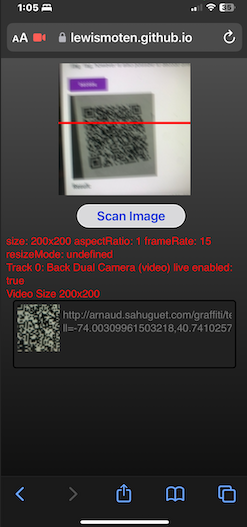
Today I have been experimenting with a few libraries to detect barcodes with javascript alone.
I started off with Quagga2. It doesn’t natively support QR Codes, but an extension is available to add that capability. After much experimentation, it couldn’t detect the proper location of barcodes in an image. The barcodes that it did detect never came across with the contents of the barcodes, or the format.

I moved onto the Zebra Crossing (zxing-js-library) which does have QR Codes as well as Aztec, Maxi Code, and PDF417. Although I had a rough start, I was finally able to get it to detect barcodes. One of the great things is that it offers the raw bytes found within the code. Very useful for data transmission. It also offers support for a few more barcodes than the barcode detection api.


A few issues.
- The corner points do not line up on the barcodes corners within the image.
- It can only detect one barcode at a time.
- Linear barcodes only have two corner points rather than describing the entire area of the barcode.
Is this my problem?
For the corner points not lining up – it doesn’t have to be my problem. Its only a problem because I’m showing a snapshot of the captured QR code in my little app. I could create a new code from scratch, or remove the icon completely. The actual app (“The Game”) doesn’t depend on the image of the barcode itself. It only needs the contents.
One barcode at a time. Again, it’s not really a big deal for me. Most QR codes in the wild are on their own. People usually don’t expect to scan multiple barcodes at once. “The Game” could make use of multiple barcode detection to increase data transfer rates, but it doesn’t need to depend on having multiple barcodes available.
Linear barcodes with two corner points. Well – I’m not working on anything with linear barcodes at the moment, and having two corner points isn’t a big deal except for image capture – which was already addressed.
So… what is my problem?
My problem is the one from yesterday. iPhones aren’t able to detect QR Codes with the Barcode Detection API. Let’s push our code and see if the iPhone can detect barcodes.
Well… the camera feed started working but its frozen. The red scanning line is still working, so my interval timer is just fine. I’m unable to choose which camera to use, so I’m stuck with the selfie image. Holding the phone up to barcodes doesn’t add any new barcodes.
So no – the iPhone doesn’t work yet. It looks like I need some feedback as to why. The iPhone still isn’t showing me anything – but Safari on MacOS is telling me the problem. I had a few problems with variables in my error handling. I fixed it and Safari on desktop is detecting QR codes. Let’s see if I can get the iPhone working now.
Nope. The video capture is still frozen with my face. It doesn’t show errors, and holding the camera up to barcodes does nothing.
I found something odd going on. When Safari is running, its making requests for /undefined on my web server. I think something is going on with my image conversion.

Hmm… the zxing library is asking for the undefined file. Lets make sure I’m passing something valid to it.
Ack!
Double Ack!
It looks like the code in the repo is a little different. I found the issue in BrowserCodeReader.ts Line 1161
// then forget about that element 😢

this.imageElement.src = undefined;
this.imageElement.removeAttribute('src');
this.imageElement = undefined;
So… assigning undefined to an image.src causes Safari to request that image. I created an issue and reported the problem as Safari requesting undefined during image cleanup.
So that’s a bug. It’s still not “My” bug. So lets recap what is going on with the iPhone.
- The camera appears to freeze, but the red scanning line is still animated
- Errors are not being displayed
- Barcodes are not being detected.
Has the video itself paused? Is the interval timer still running?
I setup a ton of error guards. Nothing. I started writing out diagnostic information like crazy. The interval timer is running. Detection is running. I went ahead and let the video element display next to the canvas element. The video has nothing. The canvas element captures the first frame of video – but that frame has never displayed on the video. I’m scratching my head over this one. In addition, I was able to get the phone to use the back camera, but I am still in the same situation.
I decided to simplify everything and see if the iPhone could support web cameras. It seemed like it could. I was getting the first frame for canvas. After much pulling of hair I got something working.
<!DOCTYPE html>
<html lang="en">
  <head>
    <title>Camera Test</title>
    <meta charset="UTF-8">
    <meta name="viewport" content="width=device-width, initial-scale=1.0">
    <style>
      video {
        border:1px solid black
      }
    </style>
  </head>
  <body>
    <video id="video" autoplay playsinline muted></video>
    <div id="message">Ready.</div>
    <script>
      document.addEventListener('DOMContentLoaded', () => {

        document.getElementById('message').innerText = 'Requesting Stream';

        navigator.mediaDevices.getUserMedia({ video: true })
          .then((stream) => {

            document.getElementById('message').innerText = 'Received stream';

            var video = document.getElementById('video');
            if('srcObject' in video) {
              video.srcObject = stream;
            } else {
              video.src = URL.createObjectURL(stream);
            }
            video.play();

          }).catch((error) => {
            document.getElementById('message').innerText = `Unable to access the camera: ${error}`;
          });
      });
    </script>
  </body>
</html>
It looks like it may be the video element itself that may be buggy on Safari iOS browsers. It works fine on Desktop Safari.
<video id="video" autoplay playsinline muted></video>
Yes… playsinline.
And here are the details from the developers on Delivering Video Content for Safari.
Without the playsinline attribute, videos must be in full-screen mode for playback on iPhone. If videos do play in full-screen mode, they will continue to play inline when the user exits full-screen mode, even if the video element doesn’t contain the playsinline property.
I detest when things go against standards. The video error event didn’t even give an error or warning to clue me in that the video will not play inline without the playsinline attribute. I haven’t seen one code example displaying the use of playsinline. This reminds me of the browser wars in the 90’s. However live streaming webcams has been around for years on end now.
Let’s go back and see if that works with our original app. A sample page is not enough to claim victory.
It works! Looking at the video, it seems I have a different problem to address after I do a bit of cleanup. The aspect ratio is not what I requested.
I tried setting the exact width/height needed. Looking at video height/width, it said it was correct – but the stream was still displaying in a tall portrait orientation. I got the settings of the video track and it confirmed the width/height was as I had requested. What it was telling me was not the same as what I was seeing.

In the end, I tried requesting a square and changed all of the height/widths accordingly. That did the trick. The final image on the canvas is no longer distorted.
navigator.mediaDevices.getUserMedia({
    video: {
      width: { exact: 200 },
      height: { exact: 200 },
      frameRate: { ideal: 15 },
      facingMode: 'environment'
    }
  }).then((stream) => {
    video.srcObject = stream;
});
Last thing. Does it detect barcodes?
No.
Safari on macOS does detect barcodes.
Safari on iOS does not detect barcodes.
| Barcode Detection | Google Chrome | Apple Safari |
| macOS | Yes | Yes |
| iOS | No | No |
With all of that effort, the barcode detection with software doesn’t work on iPhone.
I took a look at the libraries example page to Scan QR Code from Video Camera. I used my iPhone and it worked. So it is possible… There is a difference in that I’m polyfilling the Browser Detection API. I’m using the BrowserMultiFormatReader and calling decodeFromImage. Under the hood, it should work. It works on the laptop. Why is the iPhone any different with this call?
I also tried Scan 1D/2D Code from Video Camera. This is for multiple formats. Since I’m actually changing everything to an image and decoding in that way, the better example would be Scan 1D/2D Code from Image. Well, I suppose the best I can do is load up an image on the iPhone and see if at least that works.
N: No MultiFormat Readers were able to detect the code.
Hmm… and that’s with their own sample image. They didn’t let me select a photo from my phone. The demo doesn’t even work on my laptop.
I found many issues with the same problem. I stumbled upon an odd workaround in #525 decodeFromImage not working. mengyi-dev suggested setting the videoWidth property on an image to zero. Sure enough, it fixed my problem. I was even able to use the iPhone to scan the broken demo page. Both Safari and Google work!
Now onto the next phase.

Bigley Codes
I made large 2D codes yesterday for QR Codes, Aztec Codes, PDF415, and Data Matrix. At a 200×200 video stream, it’s not picking up anything. Let’s bump up the resolution.
Making both the video and canvas 600×600 was a non-starter. The canvas almost takes up the full page. I reduced the canvas back down to 200×200, but had to make a few changes. When I draw the outline around the detected barcodes, I needed to scale the points to a third of their original size.
const scalePoints = ({x, y}) => ({x: x * 1/3, y: y * 1/3});
barcodes.forEach(({cornerPoints}) => {
      ctx.lineWidth = 3;
      ctx.strokeStyle = 'Yellow';
      ctx.beginPath();
      cornerPoints.map(scalePoints).forEach((point, i) => {
        if(i === 0) ctx.moveTo(point.x, point.y);
        else ctx.lineTo(point.x, point.y);
      });
      ctx.closePath();
      ctx.stroke();
    });
It worked. Bigger is better. The QR Code was decoded perfectly. The PDF417 code threw a bunch of errors about unwarping the barcodes. That’s when I try to pull them out of the original image and make a small icon. In addition, the PDF417 code often had problems decoding the contents. I would get a string of upper case characters or numbers and symbols thrown in. Mind you – this is all Lorem Ipsum output. The only symbols should be a period, space, comma, and apostrophe. Most of it did come through ok, but many part of the decoded values were garbage.
As an added measure I tried to scan the PDF417 code on the back of my drivers license. As I was holding it up, a barcode was scanned. It was just a number. Apparently I totally missed the Code-128 barcode at the bottom of the license. It’s an unfamiliar number. It does not have any of the digits in my “customer identifier” number. The PDF417 finally scanned but nothing came through other than an empty string. I tried forcing my browser to use the zxing detection since I could get at the raw bytes, but it couldn’t pick up the code at all.
When I volunteered to help the American Red Cross – their primary way of checking people in was to scan the PDF417 code on the back of a drivers license. It was difficult to get the code scanned. Many people had their mobile phone with the Blood Donor app. It is a Code-128 and scanned without an issue quickly. 2D data is great until its not. If it doesn’t scan fast and flawlessly, it’s close to being useless.
I was unable to get the app to detect large Data Matrix and Aztec Codes. Just to confirm, I was able to detect smaller versions of the Data Matrix and Aztec Codes. I believe I need a higher resolution. I’m going to double the resolution and see if that is the issue. I’m assuming it will either be very slow, or just crash.
Yes. Unbearably slow. The Data Matrix and Aztec Codes still refused to be detected. It looks like my bias towards QR codes is a bit well founded. The error correction alone allows us to recover all of the data intact. I’m assuming the PDF417 code that I created with TEC-IT Barcode Generator didn’t have error correction applied. I see no settings to configure the output of the code other than colors, spacing, and image format.
Where are we at?
We are done.
- Can I scan 2D barcodes? Yes
- What kinds? Aztec, Matrix Code, PDF417, QR Code
- Reliably? Yes – usually. see max size
- At the max size? No. Only QR and PDF417 scanned. PDF417 was corrupted.
- Can it be done with iPhone? Yes – polyfilled API with zxing library
- Is it fast? Yes
- 200×200 is great
- 1200×1200 is very slow and choppy
Try it out
- Source Code: https://github.com/lewismoten/Barcode-Detection
- Demo: https://lewismoten.github.io/Barcode-Detection/