Unicode Support
I changed a few things around and added support for Unicode. Originally I was converting bytes to individual characters, one at a time, and translating them back as ASCII text. Now I use the TextEncoder and TextDecoder to translate text into bytes and back into text again, which encodes text as UTF-8. I can send over Unicode characters from different alphabets as well as emoji characters.

function bytesToText(bytes) {
  return new TextDecoder().decode(bytes);
}
function textToBytes(text) {
  return new TextEncoder().encode(text);
}
function bitsToText(bits) {
  const bytes = new Uint8Array(bitsToBytes(bits));
  return bytesToText(bytes.buffer);
}
function textToBits(text) {
  return bytesToBits(textToBytes(text));
}
function bytesToBits(bytes) {
  return bytes.reduce((bits, byte) => [
      ...bits,
      ...byte
        .toString(2)
        .padStart(8, '0')
        .split('')
        .map(Number)
    ], []);
}
function bitsToBytes(bits) {
  const bytes = [];
  for(let i = 0; i < bits.length; i+= 8) {
    bytes.push(
      parseInt(
        bits
          .slice(i, i + 8)
          .join('')
        , 2
      )
    );
  }
  return bytes;
}
Unicode differs from ASCII in that it takes more bytes to represent each character. You are not limited to just 256 characters. As of Unicode 15.0, it contained close to 150,000 characters. UTF-8 is a way of encoding those characters as binary data. It can use one or more bytes to represent one character of unicode.
| Alphabet | Character | ASCII | Unicode Codepoint | UTF-8 |
|---|---|---|---|---|
| Latin | A | 0x41 | U+0041 | 0x41 |
| Japanese Hiragana | あ | U+3042 | 0xE38182 | |
| Emoji | 💩 | U+1F4A9 | 0xF09F92A9 |
The “8” in UTF-8 indicates how many bits it uses for each block. UTF-8 uses one to four blocks to represent a character. UTF-16 uses one to two blocks, but the blocks are made up of 16 bits. An interesting tool is available online called Convert Unicode to Bytes that lets you test different types of unicode encodings.
| Encoding | Bits per Block | Blocks per Character | Codepoints |
|---|---|---|---|
| ASCII | 8 | 1 | 256 |
| UTF-7 | 7 | 1 – 2 | 65,536 |
| UTF-8 | 8 | 1 – 4 | 1,114,111 |
| UTF-16 | 16 | 1 – 2 | 1,114,111 |
| UTF-32 | 32 | 1 | 1,114,111 |
UTF-7 is rarely used except in older systems and has limitations in the number of code points supported. It also has security vulnerabilities where certain encodings can bypass security checks. UTF-8 is the most widely used format since it supports the entire space of unicode code points, and is backwards compatible with ASCII (You can still read all of the lower-ascii Latin characters). It differs in that any byte that has a “1” as the most significant bit indicates it is a unicode character outside of the ASCII character table. UTF-32 is a fixed-width encoding in that all characters use 32 bits. UTF-16 is similar to UTF-32, in that its intent is to be fixed-width, except that it also supports supplementary characters that need an additional block. Although UTF-8, UTF-16, and UTF-32 can represent the same characters, the underlying byte encodings are not compatible with each other. The only compatibility is with UTF-8 and the lower portion of ASCII characters.
Fixing the graphs
With the latest adventure of packetization, the graphs that showed bits coming across the various channels is no longer displaying the information received. Let’s fix that.
- Frequency line chart
- Does not display segment numbers after the first packet
- Does not display sample counts after the first packet
- Channel data
- Does not display channel values
- Does not display channel “error” backgrounds in any packet
- Does not display channel backgrounds after the first packet


My old code had a variable called EXPECTED_BITS. I now had a different variable called SENT_ENCODED_BITS to clarify that it was from the sender of the original message, which will later come into play once I play around with two separate devices communicating with each other. I may be able to use error correction to highlight sent bits that failed – but error correction is not the same as error detection if more than one bit fails in a block.

I moved too quickly. The variable that I really want is SENT_TRANSFER_BITS. These are the bits that were actually sent during transfer after they were interleaved.
Let’s look at why it isn’t going past the first packet. My assumption is that it’s based on the LAST_STREAM_STARTED and the fixed end of the first packet.
I found the problematic code for the backgrounds:
  const packetDuration = getPacketDurationMilliseconds();
  const lastStreamEnded = LAST_STREAM_STARTED + packetDuration;
    // draw segment data background
    let expectedBitCount = channelCount;
    if(segmentEnd === lastStreamEnded) {
      expectedBitCount = packetBitCount % channelCount;
    } else if(segmentEnd > lastStreamEnded) {
      continue;
    }
The variable lastStreamEnded is based on the end of the first packet, not the entire stream.
Two Days Later…
Well, suffice to say, I went down a rabbit hole. The graphs are difficult to work with. Lots of the code is difficult to work with. What was a small example project became a pretty complex file with a few thousand lines of code. It was time to start separating things out.
Things are not fully separated, but they are mostly on their way.
So… whats’ the big news? Image transfer!

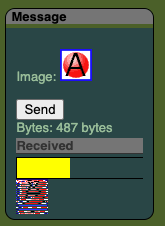
I created a small interlaced GIF image so that I could watch the image load as it is transferred. I don’t recall being so excited to watch an image slowly download before since I was a teenager. The full image didn’t come though, but enough came over that the browser was able to recognize it as a valid image. There are two functions I had to make to be able to transfer and receive the image.
Reading Binary Files
It’s fairly easy to convert an image to an array of binary data using image and canvas. However, you are creating a new image without much control over the binary data. I wanted the original image bytes where I knew it was a GIF 89a image with a 16 color indexed palette and interlaced. You could get the binary data of a url using fetch, but you would end up with having to execute an asynchronous call, which doesn’t work well when you are calling it from a synchronous function. await doesn’t work. There isn’t a way to wait for a promise to resolve unless you are calling it from an asynchronous function as well.
The answer was to use the old XMLHttpRequest. It isn’t as simple as turning off the asynchronous option – but that’s a major step in the correct direction. You can’t set the response type to an array buffer with synchronous calls, so you have to work with the response as a string. Looping through each character, you could use charCodeAt(index) – but the gotcha is that you are working with Unicode. If the prior character codes indicate that the current character is part of a Unicode character, you’ll git a value greater than 255. The quick fix is to do a bitwise operation to only get the last 8 bits such as xhr.response.charCodeAt(index) & 0xFF. That will almost get you to where you need to go – but you’ll notice that a few bytes are missing. The final step is to override the mime-type to be user-defined at text/plain; charset=x-user-defined.
export const urlToBytes = src => {
  const xhr = new XMLHttpRequest();
  // we need a synchronous response.
  xhr.open('GET', src, false);
  xhr.overrideMimeType('text/plain; charset=x-user-defined');
  xhr.send(null);
  if(xhr.status !== 200) return [];
  let bytes = [];
  for(let i = 0; i < xhr.response.length; i++) {
    bytes.push(xhr.response.charCodeAt(i) & 0xFF);
  }
  return bytes;
}
Converting bytes into a URL is fairly simple and hardly worth mentioning. However, here it is:
export const bytesToUrl = bytes => {
  const blob = new Blob([new Uint8Array(bytes)]);
  return URL.createObjectURL(blob);
}
Although the image often fails to transfer completely, I just got it to work 100% for the first time. It’s possible! I need to work on making the transfer stable, and allow for the audio to play several times to repair only the packets that failed to transfer.
The current state of the application is still in disrepair after the “Speed” panel. All panels prior to the channel graph are setup with a new framework and have their own files.