I had a bit of fun this morning. I woke up and found a voicemail from the library stating that I had won a raffle. They had a table setup at Main Street Geek on May the 4th (Star Wars Holiday) and also “Free Comic Book Day”. I arrived at the library and saw two miniature Lego sets among all of the Star Wars themed toys to choose from.

I started working on huffman compression, researching how it works and implementing the logic behind it. It’s a fun problem. As I worked through it, I realized that the packet size of 128 characters wasn’t really that great if most of the characters are unique. In addition, I would need to send the tree of encoded symbols with the packet – reducing the effectiveness of compression. A better solution would be to compress the data first, and then split it up into smaller packets so that the symbol tree is only sent with the first packet and reused afterwards. This brings up the whole idea where I need to keep my packet lengths consistent by splitting the data across multiple packets.
Currently, error correction also extends my packet size way beyond the 128 byte limit. I feel that I may be applying the “layering” of what I’m doing in the wrong order. I want to keep my packet sizes at a hard-coded size. No more, no less than 128 bytes. This means that I need to apply error checking and compression to the data before I split it into individual packets. While I’m at it, I should probably remove the 128 byte limit of the text input, and split over multiple packets as needed.
So todays goal is to broadcast multiple packets, and assemble them back together.
If I have extra time, I may work on a two-way communication to request the transmission of packets out of sequence that may have been detected with errors. In fact, let’s look at that now.
If error correction is applied across the whole data stream, it’s going to cause a problem where an error block crosses between two packets. The reason is that even though a error detection (ie crc32 or checksum) may indicate a bit was off, I may have enough error correction to recover from that error. Instead, the error detection check should be ran against the decoded data – not the error correcting data. With this, I should determine the number of error blocks I can fit within a packet and pad the rest of the packet with zeros.
Packet Size
So for our first step, let’s define the hard-coded packet size through the UI and setup small packets of 16 bytes. With a base 2 power from 0 to 16, our packets can be anywhere from 1 to 65,536 bytes (64 kb).
Packet Size:
2^<input id="packet-size-power" type="number" min="0" max="16">
<span id="packet-size"></span>
<br>
 var PACKET_SIZE_BITS = 4; // 16 bytes

 document.getElementById('packet-size-power').value = PACKET_SIZE_BITS;
 document.getElementById('packet-size').innerText = friendlyByteSize(2 ** PACKET_SIZE_BITS);
 document.getElementById('packet-size-power').addEventListener('input', event => {
    PACKET_SIZE_BITS = parseInt(event.target.value);
    document.getElementById('packet-size').innerText = friendlyByteSize(2 ** PACKET_SIZE_BITS);
});

function friendlyByteSize(count) {
  let unitIndex = 0;
  const units = ['bytes', 'kb', 'mb', 'gb', 'tb', 'pb'];
  while(count > 900) {
    count /= 1024;
    unitIndex++;
    if(unitIndex === units.length - 1) break;
  }
  count = Math.floor(count * 10) * 0.1
  return `${count.toLocaleString()} ${units[unitIndex]}`
}
Now that we have an agreed packet size, we no longer need to prefix our packets with the packet size. Both the sender and receiver already know what this value is.
Next up is to divide the error blocks into individual packets. This is where it gets a bit tricky. The error block size is an odd number – 7 bits. Our data packet sizes are an even number (usually). We have 1, 2, 4, 8, 1, 32, 64, 128, 256, … 65,536. We don’t want our error blocks to span across packets. We also want to re-request data packets out of sequence. So we need a function to determine what the packet data looks like for a given packet number. So we need some functions to support the initial loop that sends all the packets:
const packetCount = getPacketCount(bits);
for(let i = 0; i < packetCount; i++) {
  const packet = getPacket(bits, i);
  sendPacket(packet);
}
Since we are sending multiple packets, we also need to tell the logic not only what packet to send, but when to start sending it. Since they may be sent out of order later on, this is even more important to do since the start times will change from the initial packet sent.
const start = audioContext.currentTime + 0.1;
const packetDuration = Math.ceil((2 << PACKET_SIZE_BITS) / channelCount) * SEGMENT_DURATION;
const packetCount = getPacketCount(bits);
for(let i = 0; i < packetCount; i++) {
  const packet = getPacket(bits, i);
  sendPacket(packet, start + (i * packetDuration));
}
Our sendPacket logic is mostly what we had before, except that instead of basing everything off of the audio contexts current time, we base it on the packetStart time.
function sendPacket(bits, packetStart) {
  var audioContext = getAudioContext();
  const channels = getChannels();
  const oscillators = [];
  const channelCount = channels.length;
  const destination = SEND_VIA_SPEAKER ? audioContext.destination : getAnalyser();
  // create our oscillators
  for(let i = 0; i < channelCount; i++) {
    var oscillator = audioContext.createOscillator();
    oscillator.connect(destination);
    oscillator.type = WAVE_FORM;
    oscillators.push(oscillator);
  }
  // change our channel frequencies for the bit
  for(let i = 0; i < bits.length; i++) {
    const isHigh = bits[i];
    const channel = i % channelCount;
    const segment = Math.floor(i / channelCount);
    var offset = ((segment * SEGMENT_DURATION)/1000);
    var offset2 = (((segment+1) * SEGMENT_DURATION)/1000) - (1/100000);
    oscillators[channel].frequency.setValueAtTime(
      channels[channel][isHigh ? 1 : 0],
      packetStart + offset
    );
    oscillators[channel].frequency.setValueAtTime(
      channels[channel][isHigh ? 1 : 0],
      packetStart + offset2
    );
  }
  // start sending our signal
  oscillators.forEach(o => o.start(packetStart));
  // silence oscillators when done
  for(let i = bits.length; i < bits.length + channelCount; i++) {
    const channel = i % channelCount;
    const segment = Math.floor(i / channelCount);
    const offset = ((segment * SEGMENT_DURATION) / 1000);
    oscillators[channel].frequency.setValueAtTime(0, packetStart + offset);
    oscillators[channel].stop(packetStart + offset);
  }
}
Now onto the hard part – getPacketCount and getPacket. Let’s work on the count. If we don’t have error correction turned on, it’s safe to send all bits as-as without considering wrapping of blocks. If our packet size is too small, then we can’t send any error blocks at all. Since our packet size is a minimum of 8 bits, and the error correction block needs 7 bits, we will not run into this issue. However, it feels like the guard should be in place “just in case”. We start out by determining how many error blocks can fit within one packet, determine how many blocks it will take to represent the total bit stream, and divide the total blocks by the packet blocks to come up with our final number.
function getPacketCount(bits) {
  const totalBits = bits.length;
  const packetSizeBitCount = (2 ** PACKET_SIZE_BITS) * 8;
  if(!HAMMING_ERROR_CORRECTION) {
    return Math.ceil(totalBits / packetSizeBitCount);
  }
  // Packet not big enough to support error correction
  if(packetSizeBitCount < ERROR_CORRECTION_BLOCK_SIZE) {
    return 0;
  }

  // How many error blocks can be in a packet?
  const packetBlocks = Math.floor(
    packetSizeBitCount /
    ERROR_CORRECTION_BLOCK_SIZE
  );

  // How many error blocks are needed for the entire bit stream?
  const totalBlocks = Math.ceil(
    totalBits /
    ERROR_CORRECTION_DATA_SIZE
  );

  // Return the total number of packets needed to send all error blocks
  return Math.ceil(totalBlocks / packetBlocks);
}
The last part is to grab all the bits needed for the packet.
Okay, so I went down a bit of a rabbit hole for a while breaking the data up into separate packets. It’s also affected the receiving end of things I’ve currently got the application in a state where I can send the data as multiple packets correctly. In the middle of all of that, I had to drive over to Winchester, Virginia to meet with a friend for about an hour.
Receiving the data is a different story. I believe it’s stopping after it receives the first packet.
Since all packets are a fixed size, they are padded with zeros at the end of the data stream if the data being sent is not large enough to fill the entire packet. This is fairly noticeable at the tail-end of the stream since only the “low” frequencies are in use.

And as I was starting to write this, I decided to change colors of each channel to match the Hz to a Hue, rather than matching a channel index. If I use a bunch of low frequencies, all channels will be red.


That was a quick shiny thing moment. Let’s get back to splitting data between multiple packets. What a night mare. I had to redo a bit of logic so that I could re-use my existing oscillators between each packet. I created a few functions for the oscillators
- createOscillators(streamStartSeconds) – creates an array of oscillators and starts them at the specified time. Also changes the “Send” button text to “Stop”
- getOscillators() – gets the existing array of oscillators
- changeOscillators(bits, startSeconds) – changes the oscillators frequencies to represent the bits high/low state
- stopOscillators(streamEndSeconds) – stops all oscillators at a specified time.
- disconnectOscillators() – stops all oscillators now, and disconnects them from the audio destination. Also changes the “Send” button text from “Stop” back to “Send”
const CHANNEL_OSCILLATORS = [];
function createOscillators(streamStartSeconds) {
  const oscillators = getOscillators();
  if(oscillators.length !== 0) disconnectOscillators();
  var audioContext = getAudioContext();
  const channels = getChannels();
  const channelCount = channels.length;
  const destination = SEND_VIA_SPEAKER ? audioContext.destination : getAnalyser();
  // create our oscillators
  for(let i = 0; i < channelCount; i++) {
    const oscillator = audioContext.createOscillator();
    oscillator.connect(destination);
    oscillator.type = WAVE_FORM;
    oscillator.start(streamStartSeconds);
    oscillators.push(oscillator);
  }
  sendButton.innerText = 'Stop';
  return oscillators;
}
function getOscillators() {
  return CHANNEL_OSCILLATORS;
}
function changeOscillators(bits, startSeconds) {
  const oscillators = getOscillators();
  getChannels().forEach((channel, i) => {
    // missing bits past end of bit stream set to zero
    const isHigh = bits[i] ?? 0;
    const oscillator = oscillators[i];
    // already at correct frequency
    if(oscillator.on === isHigh) return;
    oscillator.on = isHigh;
    const hz = channel[isHigh ? 1 : 0];
    oscillator.frequency.setValueAtTime(hz, startSeconds);
  });
}
function stopOscillators(streamEndSeconds) {
  const channels = getChannels();
  const oscillators = getOscillators();
  const channelCount = channels.length;
  // silence oscillators when done
  for(let channel = 0; channel < channelCount; channel++) {
    const oscillator = oscillators[channel];
    oscillator?.stop(streamEndSeconds);
  }
}
function disconnectOscillators() {
  stopOscillators(getAudioContext().currentTime);
  const oscillators = getOscillators();
  oscillators.forEach(
    oscillator => oscillator.disconnect()
  )
  oscillators.length = 0;
  sendButton.innerText = 'Send';
  stopTimeoutId = undefined;
}
So we have all of our functions to interact with the oscillators. The next set of functions work with sending the data as multiple packets. I’ve created a ton of separate functions to split up the heavy lifting since the calculations were used in multiple places.
- sendBits(bits) – an array of ones and zeros of bits to send.
- sendPacket(bits, packetStartSeconds) – Sends the bits for a specific packet starting at the specified time
- getPacketBitCount() – gets the fixed number of bits that make up an entire packet
- getPacketDurationSeconds() – gets the number of seconds it takes for a single packet to transfer based on the packet size, segment duration, and number of channels available
- getPacketCount(bitCount) – gets the number of packets needed to transfer the number of bits provided, with consideration for hamming error correction if enabled, so that no hamming error block will cross into the next packet.
- getDataTransferDurationSeconds(bitCount) – calculates the total seconds necessary to transfer all packets.
- getDataTransferDurationMilliseconds(bitCount) – calculates the total milliseconds necessary to transfer all packets
- resumeGraph() – starts the graph back up if it was previously paused
function sendBits(bits) {
  const bitCount = bits.length;
  if(bitCount === 0) {
    logSent('No bits to send!');
    return;
  }
  EXPECTED_BITS = bits.slice();
  EXPECTED_ENCODED_BITS = [];

  // add 100ms delay before sending
  const startSeconds = audioContext.currentTime + 0.1;
  const startMilliseconds = startSeconds * 1000;

  const packetBitCount = getPacketBitCount();
  const packetDurationSeconds = getPacketDurationSeconds();
  const packetCount = getPacketCount(bitCount);
  const totalDurationSeconds = getDataTransferDurationSeconds(bitCount);
  const totalDurationMilliseconds = getDataTransferDurationMilliseconds(bitCount);

  createOscillators(startSeconds);
  // send all packets
  for(let i = 0; i < packetCount; i++) {
    let packet = getPacketBits(bits, i);
    if(packet.length > packetBitCount) {
      console.error('Too many bits in the packet.');
      disconnectOscillators();
      return;
    }
    packet = applyInterleaving(packet);
    EXPECTED_ENCODED_BITS.push(...packet);
    sendPacket(packet, startSeconds + (i * packetDurationSeconds));
  }
  stopOscillators(startSeconds + totalDurationSeconds);
  stopTimeoutId = window.setTimeout(
    disconnectOscillators,
    startMilliseconds + totalDurationMilliseconds
  );
  // show what was sent
  document.getElementById('sent-data').value =
    EXPECTED_BITS.reduce(bitReducer, '');
  document.getElementById('encoded-data').value =
    EXPECTED_ENCODED_BITS.reduce(bitReducer, '');

  // start the graph moving again
  resumeGraph();
}
function sendPacket(bits, packetStartSeconds) {
  const channels = getChannels();
  const channelCount = channels.length;
  let bitCount = bits.length;
  const segmentDurationSeconds = getSegmentTransferDurationSeconds();
  for(let i = 0; i < bitCount; i += channelCount) {
    const segmentBits = bits.slice(i, i + channelCount);
    const segmentIndex = Math.floor(i / channelCount);
    var offsetSeconds = segmentIndex * segmentDurationSeconds;
    changeOscillators(segmentBits, packetStartSeconds + offsetSeconds);
  }
}
My computer is getting slow. I need to reboot.
I’m back.
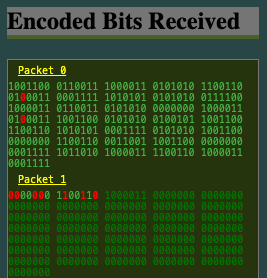
I’m in a bit of a mess. The data isn’t decoding properly. I’m still working out why. It’s getting late … or early? It’s almost 5am and the birds are already chirping. I need to get some rest. No video today, but I’ll leave a screenshot. It’s not pretty. The frequency graph has lost access to data to compare against (more on that tomorrow?), and doesn’t attempt to capture anything after the first packet is received. The data in the second packet becomes corrupt, so I think I’m not decoding things properly. The main thing you’ll see is that my text boxes are now div tags and I group the data into packets.

If I have error correction on, the original data is split into blocks of 4 (nibbles), otherwise blocks if 8 (bytes). The error correction uses blocks of 4 and changes them into blocks of 7. Error correcting box groups into blocks of 7 bits. The bits sent window groups them into channel size so I can see what is sent on each channel. I also added a ton of info to a “Data” panel similar to the “Packet” and “Information” panels. Some of the packet and information panels are duplicated or wrong based on older algorithms.